backend
Version, currently 0.0.13 versions
- 0.0.3latestNov 27, 2016
- 0.0.2not indexedNov 27, 2016
- 0.0.1not indexedNov 27, 2016
github.com/Fusion/crystalvault
A zero-knowledge server to store and share secrets: credentials, keys, etc.
9 stars
0 dependents
License: not declared
Nothing has been indexed for 0.0.1 yet. The tag is recorded, its shard.yml has not been read, so the manifest and dependency list below are empty because they are unknown rather than because they are absent.
Installation
# Add this to your shard.yml
dependencies:
  backend:
    github: Fusion/crystalvault
    version: ~> 0.0.1
Then run:
shards installshard.yml
No shard.yml has been indexed for 0.0.1. You can read it on the repository.
Dependencies
Unknown: the shard.yml for this version has not been read yet.
README
This README is the one indexed from the repository at its latest ref, not from the tag for this version.
# crystalvault
## TOC:
* Rationale and Security
* Manual Setup (option #1)
* Docker Setup (option #2)
* Usage
* Credits
* Contributing
## Rationale and Security
Please read (preferably in a browser):
[Goals, Security, FAQ](public/content/design_content.txt)
## Manual Setup (option #1)
* On a fresh Linux install, e.g. Ubuntu 14.04
* **Optional:** Install Dropbox
* Install Crystal
* Alternatively you could build on a dev machine and install on prod environment
but this is not covered in this file
* Pick a work directory (work-directory)
* Clone git environment in work-directory: `git clone https://github.com/Fusion/crystalvault.git`
* Create directory structure: `work-directory/{data/auth, data/keys/, data/logs}`
* **Optional:** Create a symbolink link from the Dropbox folder to `work-directory/data/data`
* Alternatively create `work-directory/data/data` -- ensure it is writable
* Run server -- now accessible at `http://your-server:3000` or through a load balancer
* Ready
## Docker Setup (option #2)
Note that, for backup and file history reasons,
the docker version of this vault insists on storing its data on Dropbox.
Keep in mind that it is encrypted data so you are getting the best of both worlds.
In an enterprise environment, you may be behind a firewall.
In that case, provide at least a `HTTPS_PROXY` environment variable.
Port 3000 is exposed, as well as the /dbox/Dropbox folder.
To complete linking to Dropbox, check the content of /var/log/dropbox. For instance:
docker run -d —restart=always —name tvault cyansmoker/crystalvault
docker exec -it tvault tail -f /var/log/dropbox
After a while, you should see this line:
> Please visit https://www.dropbox.com/cli_link_nonce?nonce=<nonce> to link this device.
Follow that link, authorize the container and after a few seconds Dropbox should start synchronizing.
Note that the container will wait for Dropbox to be properly mounted before starting the vault itself.
You will then be able to browse the vault at http://container-ip:3000 (or whatever load balancer you are using, if any)
## Usage
* Users will be identified using their chosen email address.
* Each user's public PGP key must be stored on the server. Specifically, in:
`work-directory/data/keys/user-s-email-address`
* Additionally, each user needs to pick a password. The sole purpose of that password
is to force users to authenticate before they are allowed to delete files(!)
Instruct new users to visit `http://your-server:3000/newuser.json/user-s-email-address/user-s-password`
and send the resulting output to you. You know what to do next!
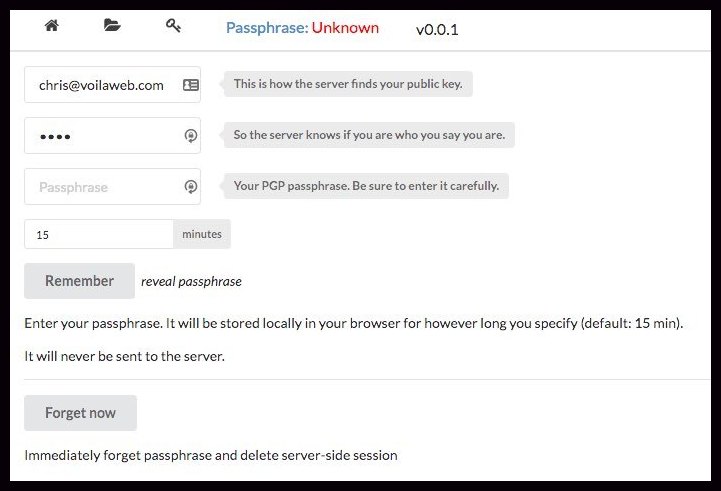
* Whenever a user visits `http://your-server:3000` they should click on 'Passphrase'
and enter: `user-s-email-address`, `user-s-password` and their secret PGP pass phrase.
Please visit [Goals, Security, FAQ](public/content/design_content.txt) to learn more about
the security measures taken to protect the pass phrase.
<p></p>
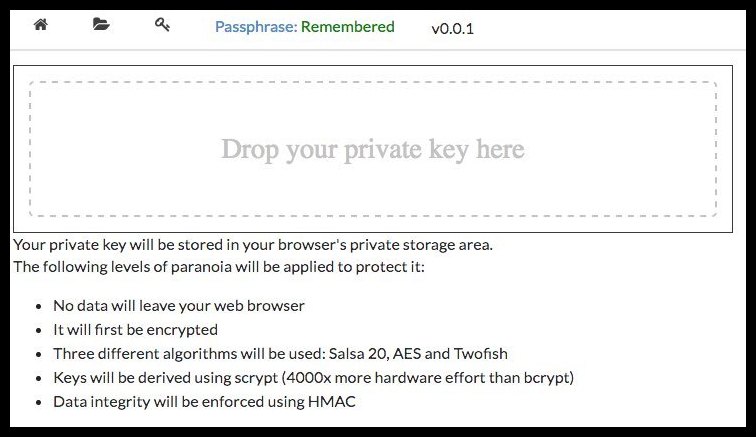
* If they have not done so yet, they should then click the key icon and drag/drop
a file containing their private PGP key.
This key will be securely encrypted and
never leave their browser. Again, have a look at
[Goals, Security, FAQ](public/content/design_content.txt) for more information.
<p></p>
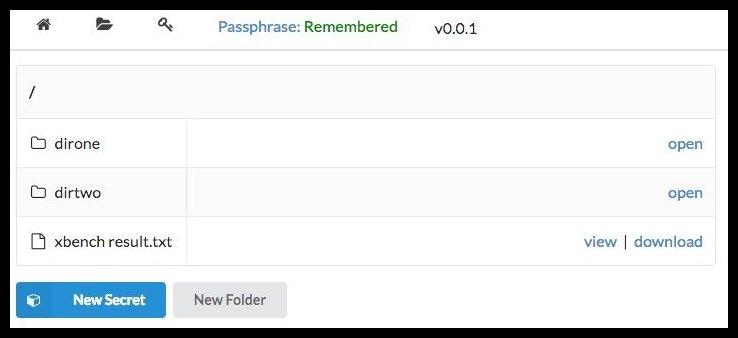
* They can now click the folder icon and start creating new secrets and retrieving
the secrets they are allowed to read.
## Credits
* [Keybase's TripleSec](https://keybase.io/triplesec)
* [Keybase's kbpgp.js](https://keybase.io/kbpgp)
* [The Vault-Tec icon](https://commons.wikimedia.org/wiki/File:Vault-Tec_Corporation_logo.svg)
## Contributing
1. Fork it ( https://github.com/Fusion/crystalvault.git )
2. Create your feature branch (git checkout -b my-new-feature)
3. Commit your changes (git commit -am 'Add some feature')
4. Push to the branch (git push origin my-new-feature)
5. Create a new Pull Request
## Contributors
- [fusion](https://github.com/fusion) Chris F Ravenscroft - creator, maintainer
Documentation
Built from the current release. The first visit to a release nobody has asked for starts its build.
Links
This release
- Version
0.0.1- Tagged
- Nov 27, 2016
- Commit
b271b0c07b90- Indexed
- not yet
Dependents
No indexed shard depends on this one yet.
Repository
github.com/Fusion/crystalvault
Metadata
- Created
- Aug 12, 2026
- Updated
- Aug 12, 2026
- Synced
- Aug 12, 2026
- Versions
- 3