fingers
Version, currently 1.1.369 versions
- 2.7.1latestJun 9, 2026
- 2.7.0not indexedJun 22, 2026
- 2.6.2not indexedJun 22, 2026
- 2.6.1not indexedJun 22, 2026
- 2.6.0not indexedJun 22, 2026
- 2.5.1not indexedJun 22, 2026
- 2.5.0not indexedJun 22, 2026
- 2.4.1not indexedJun 22, 2026
- 2.4.0not indexedJun 22, 2026
- 2.3.3not indexedJun 22, 2026
- 2.3.2not indexedJun 22, 2026
- 2.3.1not indexedJun 22, 2026
- 2.3.0not indexedJun 22, 2026
- 2.2.2not indexedJun 22, 2026
- 2.2.1not indexedJun 22, 2026
- 2.2.0not indexedJun 22, 2026
- 2.1.5not indexedJun 22, 2026
- 2.1.4not indexedJun 22, 2026
- 2.1.3not indexedJun 22, 2026
- 2.1.2not indexedJun 22, 2026
- 2.1.1not indexedJun 22, 2026
- 2.1.0not indexedJun 22, 2026
- 2.0.6not indexedJun 22, 2026
- 2.0.5not indexedJun 22, 2026
- 2.0.4not indexedJun 22, 2026
- 2.0.3not indexedJun 22, 2026
- 2.0.2not indexedJun 22, 2026
- 2.0.1not indexedJun 22, 2026
- 2.0.0not indexedJun 22, 2026
- 2.0.0-alpha3not indexedJun 22, 2026
- 2.0.0-alpha2not indexedJun 22, 2026
- 2.0.0-alpha1not indexedJun 22, 2026
- 1.1.3not indexedJun 22, 2026
- 1.1.2not indexedJun 22, 2026
- 1.1.1not indexedJun 22, 2026
- 1.0.1not indexedJun 22, 2026
- 1.0.0not indexedJun 22, 2026
- 0.10.1not indexedJun 22, 2026
- 0.10.0not indexedJun 22, 2026
- 0.9.0not indexedJun 22, 2026
- 0.8.0not indexedJun 22, 2026
- 0.7.2not indexedJun 22, 2026
- 0.7.1not indexedJun 22, 2026
- 0.7.0not indexedJun 22, 2026
- 0.6.3not indexedJun 22, 2026
- 0.6.2not indexedJun 22, 2026
- 0.6.1not indexedJun 22, 2026
- 0.6.0not indexedJun 22, 2026
- 0.5.0not indexedJun 22, 2026
- 0.4.1not indexedJun 22, 2026
- 0.4.0not indexedJun 22, 2026
- 0.3.8not indexedJun 22, 2026
- 0.3.7not indexedJun 22, 2026
- 0.3.6not indexedJun 22, 2026
- 0.3.5not indexedJun 22, 2026
- 0.3.4not indexedJun 22, 2026
- 0.3.3not indexedJun 22, 2026
- 0.3.2not indexedJun 22, 2026
- 0.3.1not indexedJun 22, 2026
- 0.3.0not indexedJun 22, 2026
- 0.2.0not indexedJun 22, 2026
- 0.1.6not indexedJun 22, 2026
- 0.1.5not indexedJun 22, 2026
- 0.1.4not indexedJun 22, 2026
- 0.1.3not indexedJun 22, 2026
- 0.1.2not indexedJun 22, 2026
- 0.1.1not indexedJun 22, 2026
- 0.1.0not indexedJun 22, 2026
- 0.0.1not indexedJun 22, 2026
github.com/Morantron/tmux-fingers
copy pasting in terminal with vimium/vimperator like hints.
1461 stars
0 dependents
License: MIT
Nothing has been indexed for 1.1.3 yet. The tag is recorded, its shard.yml has not been read, so the manifest and dependency list below are empty because they are unknown rather than because they are absent.
Installation
# Add this to your shard.yml
dependencies:
  fingers:
    github: Morantron/tmux-fingers
    version: ~> 1.1.3
Then run:
shards installshard.yml
No shard.yml has been indexed for 1.1.3. You can read it on the repository.
Dependencies
Unknown: the shard.yml for this version has not been read yet.
README
This README is the one indexed from the repository at its latest ref, not from the tag for this version.

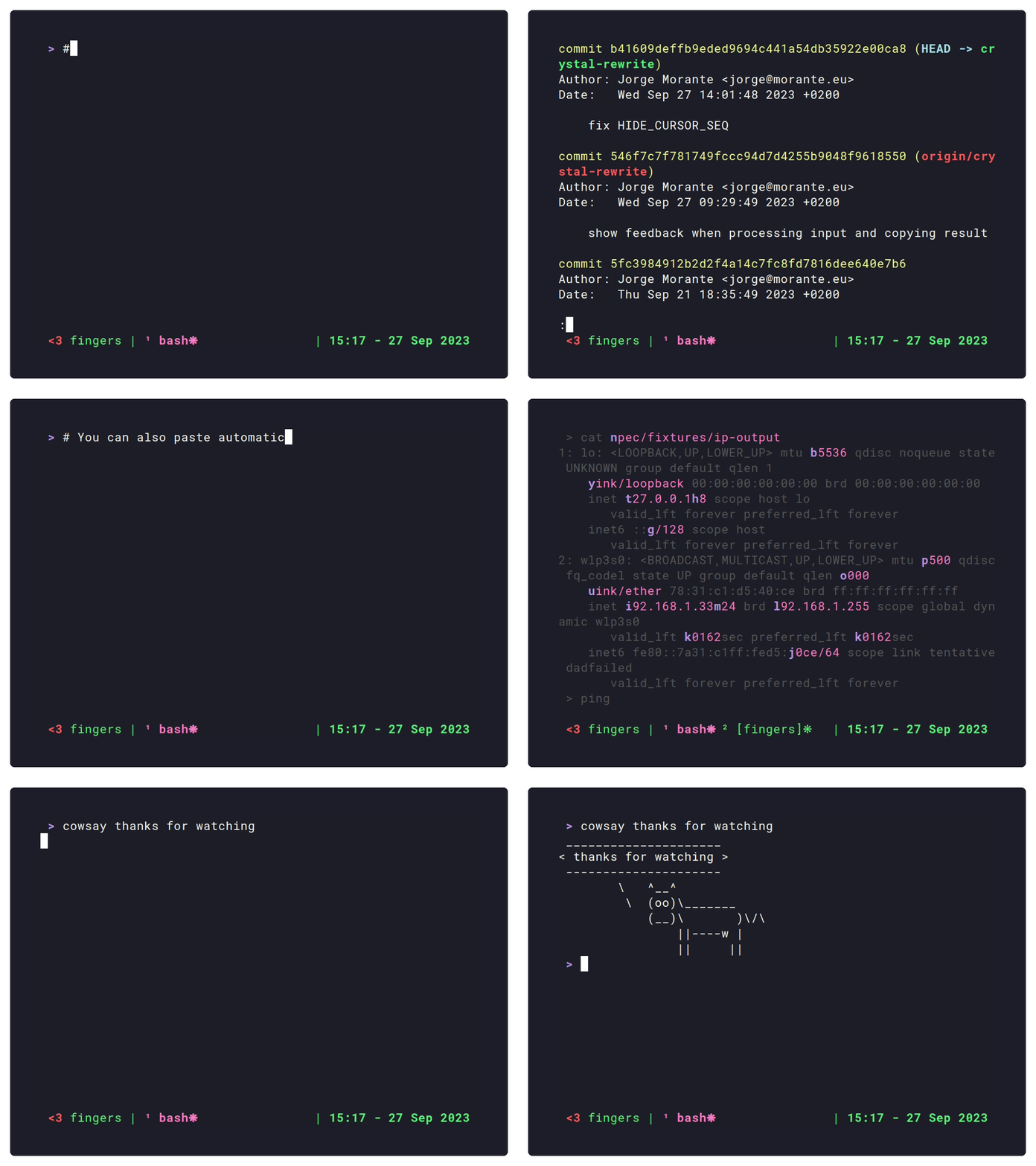
# Usage
Press ( <kbd>prefix</kbd> + <kbd>F</kbd> ) to enter **[fingers]** mode, it will highlight relevant stuff in the current
pane along with letter hints. By pressing those letters, the highlighted match
will be copied to the clipboard. Less keystrokes == profit!
Here is a list of the stuff highlighted by default.
* File paths
* SHAs
* numbers ( 4+ digits )
* hex numbers
* IP addresses
* kubernetes resources
* UUIDs
* git status/diff output
Checkout [list of built-in patterns](#fingers-enabled-builtin-patterns).
## Key shortcuts
While in **[fingers]** mode, you can use the following shortcuts:
* <kbd>a</kbd>-<kbd>z</kbd>: copies selected match to the clipboard
* <kbd>CTRL</kbd> + <kbd>a</kbd>-<kbd>z</kbd>: copies selected match to the clipboard and triggers [@fingers-ctrl-action](#fingers-ctrl-action). By default it triggers `:open:` action, which is useful for opening links in the browser for example.
* <kbd>SHIFT</kbd> + <kbd>a</kbd>-<kbd>z</kbd>: copies selected match to the clipboard and triggers [@fingers-shift-action](#fingers-shift-action). By default it triggers `:paste:` action, which automatically pastes selected matches.
* <kbd>ALT</kbd> + <kbd>a</kbd>-<kbd>z</kbd>: copies selected match to the clipboard and triggers [@fingers-alt-action](#fingers-alt-action). There is no default, configurable by the user.
* <kbd>TAB</kbd>: toggle multi mode. First press enters multi mode, which allows to select multiple matches. Second press will exit with the selected matches copied to the clipboard.
* <kbd>q</kbd>, <kbd>ESC</kbd> or <kbd>CTRL</kbd> + <kbd>c</kbd>: exit **[fingers]** mode
# Requirements
* tmux 3.0 or newer
# Installation
## Using [Tmux Plugin Manager](https://github.com/tmux-plugins/tpm)
Add the following to your list of TPM plugins in `.tmux.conf`:
```tmux
set -g @plugin 'Morantron/tmux-fingers'
```
Hit <kbd>prefix</kbd> + <kbd>I</kbd> to fetch and source the plugin. The first time you run it you'll be presented with a wizard to complete the installation. Depending on the platform, the wizard will offer the following installation methods:
- Building from source (requires [crystal](https://crystal-lang.org/install/)). _Available in all platforms_
- Install through [brew](https://brew.sh). _macOS only_.
- Download standalone binary. _Linux x86_64 and macOS arm64 only_.
## Manual
Clone the repo:
```
$ git clone https://github.com/Morantron/tmux-fingers ~/.tmux/plugins/tmux-fingers
```
Source it in your `.tmux.conf`:
```tmux
run-shell ~/.tmux/plugins/tmux-fingers/tmux-fingers.tmux
```
Reload TMUX conf by running:
```
$ tmux source-file ~/.tmux.conf
```
The first time you run it you'll be presented with a wizard to complete the installation.
# Configuration
NOTE: for changes to take effect, you'll need to source again your `.tmux.conf` file.
* [@fingers-key](#fingers-key)
* [@fingers-jump-key](#fingers-jump-key)
* [@fingers-pattern-N](#fingers-pattern-n)
* [@fingers-main-action](#fingers-main-action)
* [@fingers-ctrl-action](#fingers-ctrl-action)
* [@fingers-alt-action](#fingers-alt-action)
* [@fingers-shift-action](#fingers-shift-action)
* [@fingers-hint-style](#fingers-hint-style)
* [@fingers-highlight-style](#fingers-highlight-style)
* [@fingers-backdrop-style](#fingers-backdrop-style)
* [@fingers-selected-hint-style](#fingers-selected-hint-style)
* [@fingers-selected-highlight-style](#fingers-selected-highlight-style)
* [@fingers-hint-position](#fingers-hint-position)
* [@fingers-keyboard-layout](#fingers-keyboard-layout)
* [@fingers-show-copied-notification](#fingers-show-copied-notification)
* [@fingers-enabled-builtin-patterns](#fingers-enabled-builtin-patterns)
* [@fingers-use-system-clipboard](#fingers-use-system-clipboard)
* [@fingers-enable-bindings](#fingers-enable-bindings)
Recipes:
* [Start tmux-fingers without prefix](#start-tmux-fingers-without-prefix)
* [Using only specific patterns](#using-only-specific-patterns)
* [Using arbitrary commands](#using-arbitrary-commands)
* [Target adjacent panes](#target-adjacent-panes)
## @fingers-key
`default: F`
Customize how to enter fingers mode. Always preceded by prefix: `prefix + @fingers-key`.
For example:
```tmux
set -g @fingers-key F
```
## @fingers-jump-key
`default: J`
Customize how to enter fingers jump mode. Always preceded by prefix: `prefix + @fingers-jump-key`.
In jump mode, the cursor will be placed in the position of the match after the hint is selected.
## @fingers-pattern-N
You can also add additional patterns if you want more stuff to be highlighted:
```tmux
# You can define custom patterns like this
set -g @fingers-pattern-0 'git rebase --(abort|continue)'
# Increment the number and define more patterns
set -g @fingers-pattern-1 'some other pattern'
# You can use a named capture group like this (?<match>YOUR-REGEX-HERE)
# to only highlight and copy part of the match.
set -g @fingers-pattern-2 'capture (?<match>only this)'
# Watch out for backslashes! For example the regex \d{50} matches 50 digits.
set -g @fingers-pattern-3 '\d{50}' # No need to escape if you use single quotes
set -g @fingers-pattern-4 "\\d{50}" # If you use double quotes, you'll need to escape backslashes for special characters to work
set -g @fingers-pattern-5 \\d{50} # Escaping also needed if you don't use any quotes
```
Patterns use [PCRE pattern syntax](https://www.pcre.org/original/doc/html/pcrepattern.html).
If the introduced regex contains an error, an error will be shown when invoking the plugin.
## @fingers-main-action
`default: :copy:`
By default **tmux-fingers** will copy matches in tmux and system clipboard.
If you still want to set your own custom command you can do so like this:
```tmux
set -g @fingers-main-action '<your command here>'
```
This command will also receive the following:
* `MODIFIER`: environment variable set to `ctrl`, `alt`, or `shift` specififying which modifier was used when selecting the match.
* `HINT`: environment variable the selected letter hint itself ( ex: `q`, `as`, etc... ).
* `stdin`: copied text will be piped to `@fingers-copy-command`.
You can also use the following special values:
* `:paste:` Copy the the match and paste it automatically.
* `:copy:` Uses built-in system clipboard integration to copy the match.
* `:open:` Uses built-in open file integration to open the file ( opens URLs in default browser, files in OS file navigator, etc ).
## @fingers-ctrl-action
`default: :open:`
Same as [@fingers-main-action](#fingers-main-action) but only called when match is selected by holding <kbd>ctrl</kbd>
## @fingers-alt-action
Same as [@fingers-main-action](#fingers-main-action) but only called when match is selected by holding <kbd>alt</kbd>
## @fingers-shift-action
`default: :paste:`
Same as [@fingers-main-action](#fingers-main-action) but only called when match is selected by holding <kbd>shift</kbd>
## @fingers-hint-style
`default: "fg=green,bold"`
With this option you can define the styles for the letter hints.
You can customize the styles using the same syntax used in `.tmux.conf` for styling the status bar.
More info in the `STYLES` section of `man tmux`.
Supported styles are: `bright`, `bold`, `dim`, `underscore`, `italics`.
## @fingers-highlight-style
`default: "fg=yellow"`
Custom styles for the highlighted match. See [@fingers-hint-style](#fingers-hint-style) for more details.
## @fingers-backdrop-style
`default: ""`
Custom styles for all the text that is not matched. See [@fingers-hint-style](#fingers-hint-style) for more details.
## @fingers-selected-hint-style
`default: "fg=blue,bold"`
Format for hints in selected matches in multimode.
## @fingers-selected-highlight-style
`default: "fg=blue"`
Format for selected matches in multimode.
## @fingers-hint-position
`default: "left"`
Control the position where the hint is rendered. Possible values are `"left"`
and `"right"`.
## @fingers-keyboard-layout
`default: "qwerty"`
Hints are generated taking optimal finger movement into account. You can choose between the following:
* `qwerty`: the default, use all letters
* `qwerty-left-hand`: only use letters easily reachable with left hand
* `qwerty-right-hand`: only use letters easily reachable with right hand
* `qwerty-homerow`: only use letters in the homerow
* `qwertz`
* `qwertz-left-hand`
* `qwertz-right-hand`
* `qwertz-homerow`
* `azerty`
* `azerty-left-hand`
* `azerty-right-hand`
* `azerty-homerow`
* `colemak`
* `colemak-left-hand`
* `colemak-right-hand`
* `colemak-homerow`
* `dvorak`
* `dvorak-left-hand`
* `dvorak-right-hand`
* `dvorak-homerow`
## @fingers-show-copied-notification
`default: 0`
Show a message using `tmux display-message` notifying about the copied result.
## @fingers-enabled-builtin-patterns
`default: all`
A list of comma separated pattern names. Built-in patterns are the following:
| Name | Description | Example |
| ----------------- | --------------------------------------------------------- | ---------------------------------------------- |
| ip | ipv4 addresses | `192.168.0.1` |
| uuid | uuid identifier | `f1b43afb-773c-4da2-9ae5-fef1aa6945ce` |
| sha | sha identifier | `c8b911e2c7e9a6cc57143eaa12cad57c1f0d69df` |
| digit | four or more digits | `1337` |
| url | urls (supported protocols: http/https/git/ssh/file) | `https://asdf.com` |
| path | file paths | `path/to/file` |
| hex | hexidecimal numbers | `0x00FF` |
| kubernetes | kubernetes identifier | `deployment.apps/zookeeper` |
| git-status | will match file paths in the output of git status | `modified: ./path/to/file` |
| git-status-branch | will match branch name in the output of git status | `Your branch is up to date withname-of-branch` |
| diff | will match paths in diff output | `+++ a/path/to/file` |
## @fingers-use-system-clipboard
`default: 1`
Whether to use the system clipboard when copying matches. If set to `0`,
tmux-fingers will only copy matches to the tmux buffer.
## @fingers-enable-bindings
`default: 1`
By default, tmux-fingers will bind to `prefix` + `@fingers-key` and `prefix` +
`@fingers-jump-key`. You can opt-out of these bindings in case they clash with
other parts of your configuration.
Check [recipes](#Recipes) for alternative ways to set up bindings.
## @fingers-cli
You can set up key bindings directly to invoke tmux-fingers by using a special global option `@fingers-cli` exposed by the plugin.
The following options are available:
```
Usage:
tmux-fingers start <arguments> [options]
Arguments:
pane_id pane id (also accepts tmux target-pane tokens specified in tmux man pages) (required)
Options:
--mode can be "jump" or "default" (default: default)
--patterns comma separated list of pattern names
--main-action command to which the output will be piped
--ctrl-action command to which the output will be piped when holding CTRL key
--alt-action command to which the output will be piped when holding ALT key
--shift-action command to which the output will be pipedwhen holding SHIFT key
-h, --help prints help
```
Check some examples in the [Recipes](#Recipes) section below.
# Recipes
## Start tmux-fingers without prefix
You can start tmux-fingers without having to press tmux prefix by adding bindings like this:
```tmux
# tmux.conf
# Start tmux fingers by pressing Alt+F
bind -n M-f run -b "#{@fingers-cli} start #{pane_id}"
# Start tmux fingers in jump mode by pressing Alt+J
bind -n M-j run -b "#{@fingers-cli} start #{pane_id} --mode jump"
```
## Using only specific patterns
You can start tmux-fingers with an specific set of built-in or custom patterns.
```tmux
# match urls with prefix + u
bind u run -b "#{@fingers-cli} start #{pane_id} --patterns url"
# match hashes with prefix + h
bind h run -b "#{@fingers-cli} start #{pane_id} --patterns sha"
# match git stuff with prefix + g
bind g run -b "#{@fingers-cli} start #{pane_id} --patterns git-status,git-status-branch"
# match custom pattern with prefix + y
set -g @fingers-pattern-yolo "yolo.*"
bind y run -b "#{@fingers-cli} start #{pane_id} --patterns yolo"
```
## Using arbitrary commands
You can use tmux-fingers with any arbitrary command.
```tmux
# edit file using nvim in a new tmux window with prefix + e
bind e run -b "#{@fingers-cli} start #{pane_id} --patterns path --main-action 'xargs tmux new-window nvim'"
```
## Target adjacent panes
You can use tmux target-pane tokens to target adjacent panes. This
configuration uses vim-style <kbd>ALT</kbd>+<kbd>hjkl</kbd> keys to
directionally adjacent panes.
Also uses <kbd>ALT</kbd>+<kbd>o</kbd> to target the last pane.
```tmux
bind -n M-h run -b "#{@fingers-cli} start {left-of}"
bind -n M-j run -b "#{@fingers-cli} start {down-of}"
bind -n M-k run -b "#{@fingers-cli} start {up-of}"
bind -n M-l run -b "#{@fingers-cli} start {right-of}"
bind -n M-o run -b "#{@fingers-cli} start {last}"
```
# Acknowledgements and inspiration
This plugin is heavily inspired by
[tmux-copycat](https://github.com/tmux-plugins/tmux-copycat) ( **tmux-fingers**
predefined search are *copycatted* :trollface: from
[tmux-copycat](https://github.com/tmux-plugins/tmux-copycat) ).
Kudos to [bruno-](https://github.com/bruno-) for paving the way to tmux
plugins! :clap: :clap:
# License
[MIT](https://github.com/Morantron/tmux-fingers/blob/master/LICENSE)
Documentation
Built from the current release. The first visit to a release nobody has asked for starts its build.
Links
This release
- Version
1.1.3- Tagged
- Jun 22, 2026
- Commit
7d342ddb9976- Indexed
- not yet
Dependents
No indexed shard depends on this one yet.
Repository
github.com/Morantron/tmux-fingers
Metadata
- Created
- Aug 12, 2026
- Updated
- Aug 12, 2026
- Synced
- Aug 12, 2026
- Versions
- 69