icr
Version, currently 0.2.325 versions
- 0.9.0latestSep 26, 2021
- 0.8.0not indexedSep 26, 2021
- 0.7.0not indexedSep 26, 2021
- 0.6.0not indexedSep 26, 2021
- 0.5.0not indexedSep 26, 2021
- 0.4.0not indexedSep 26, 2021
- 0.3.0not indexedSep 26, 2021
- 0.2.14not indexedSep 26, 2021
- 0.2.13not indexedSep 26, 2021
- 0.2.12not indexedSep 26, 2021
- 0.2.11not indexedSep 26, 2021
- 0.2.10not indexedSep 26, 2021
- 0.2.9not indexedSep 26, 2021
- 0.2.8not indexedSep 26, 2021
- 0.2.7not indexedSep 26, 2021
- 0.2.6not indexedSep 26, 2021
- 0.2.5not indexedSep 26, 2021
- 0.2.4not indexedSep 26, 2021
- 0.2.3not indexedSep 26, 2021
- 0.2.2not indexedSep 26, 2021
- 0.2.1not indexedSep 26, 2021
- 0.2.0not indexedSep 26, 2021
- 0.1.2not indexedSep 26, 2021
- 0.1.1not indexedSep 26, 2021
- 0.1.0not indexedSep 26, 2021
github.com/crystal-community/icr
Interactive console for Crystal programming language
506 stars
1 dependent
License: MIT
Nothing has been indexed for 0.2.3 yet. The tag is recorded, its shard.yml has not been read, so the manifest and dependency list below are empty because they are unknown rather than because they are absent.
Installation
# Add this to your shard.yml
dependencies:
  icr:
    github: crystal-community/icr
    version: ~> 0.2.3
Then run:
shards installshard.yml
No shard.yml has been indexed for 0.2.3. You can read it on the repository.
Dependencies
Unknown: the shard.yml for this version has not been read yet.
README
This README is the one indexed from the repository at its latest ref, not from the tag for this version.
# ICR - Interactive Crystal [](https://travis-ci.org/crystal-community/icr)
Interactive console for [Crystal Programming Language](http://crystal-lang.org/).
* [Usage](#usage)
* [Require local files](#require-local-files)
* [Installation](#installation)
* [Arch Linux](#arch-linux)
* [How does it work?](#how-does-it-work)
* [Commands and special locals](#commands-and-special-locals)
* [Update check](#update-check)
* [Development](#development)
* [Editor Integration](#editor-integration)
* [Contributors](#contributors)
## Usage
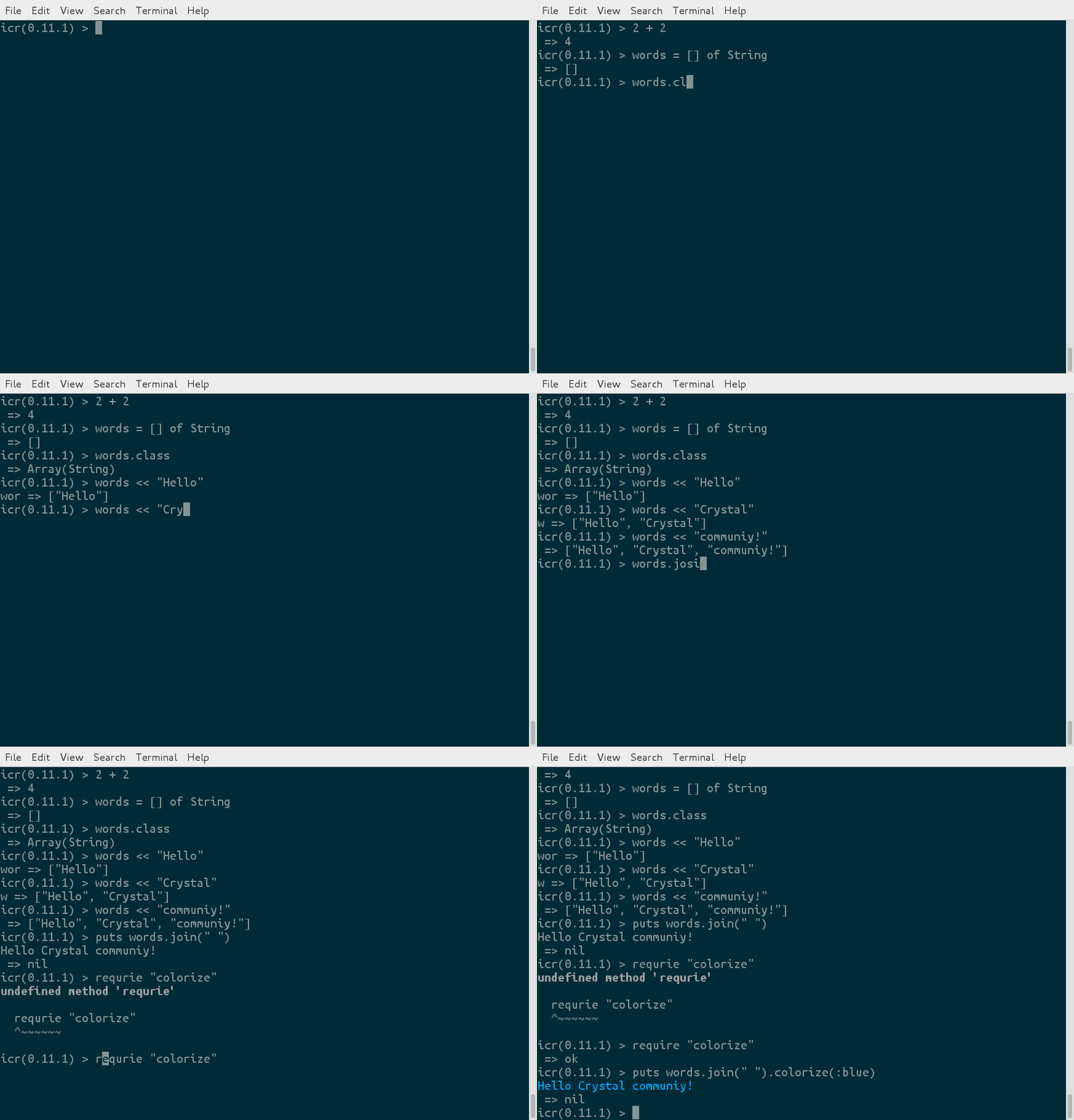
It's like irb, but for Crystal:
### Require local files
You can require local files by relative path (starts with `./`):
```
require "./src/my_cool_lib"
```
Libs can also be required from the cli:
```
$ icr -r colorize -r ./src/my_cool_lib
```
## Installation
Prerequisites:
* The latest version of crystal.
* Readline (for Debian/Ubuntu install `libreadline6-dev` package).
* LLVM development files.
Clone the repo:
```
git clone https://github.com/crystal-community/icr.git
```
Switch to repo-directory:
```
cd icr
```
Build:
```
make
```
Install:
```
sudo make install
```
### As a shard dependency
If you would like to include icr as a dependency, you can add it to your `shard.yml`
```yml
dependencies:
icr:
github: crystal-community/icr
branch: master
```
Then just run `shards install` from your project!
Enjoy!
### Arch Linux
Arch Linux users can install ICR [from AUR](https://aur.archlinux.org/packages/crystal-icr/).
## How does it work?
* Every time you press `Enter` it adds a new instruction, generates a new crystal program, and executes it.
* The output is split into 2 parts: regular program output (e.g. output from `puts 10`) and the value returned by the last command.
* The regular output is saved, and when you type a new instruction, a new program is generated. The saved output is subtracted from the new output, and the difference is printed out. It creates an illusion that only new instructions are executed :)
## Commands and special locals
* `paste` - enables paste mode
* `debug` - toggles debug mode off and on. In debug mode icr will print the code before executing it
* `quit` or `exit` - exits current interactive console
* `reset` - clears out all of the accumulated commands
* `__` - holds the result of the last expression. Example:
```crystal
icr > "5" + "2"
=> "52"
icr > __.to_i - 10
=> 42
```
## Update check
ICR periodically checks for the new releases on Github. If your current version is out of date, it will simply show you a notice at start.
You can disable this behavior using `--disable-update-check` CLI flag.
## Development
To run tests:
```
make test
```
## Editor integration
- [inf-crystal.el](https://github.com/brantou/inf-crystal.el) - Connects REPL buffer to the ICR subprocess in Emacs
## Contributors
- [greyblake](https://github.com/greyblake) Potapov Sergey - creator, maintainer
- [BlaXpirit](https://github.com/BlaXpirit) Oleh Prypin - fixes for Crystal 0.16
- [puppetpies](https://github.com/puppetpies) Brian Hood - support of records
- [jwoertink](https://github.com/jwoertink) Jeremy Woertink - support of -r option and number of other contributions
- [veelenga](https://github.com/veelenga) V. Elenhaupt - maintenance
- [MakeNowJust](https://github.com/MakeNowJust) TSUYUSATO Kitsune - syntax highlight support
Documentation
Built from the current release. The first visit to a release nobody has asked for starts its build.
Links
This release
- Version
0.2.3- Tagged
- Sep 26, 2021
- Commit
f364de6c6b67- Indexed
- not yet
Dependents
Repository
github.com/crystal-community/icr
Metadata
- Created
- Aug 12, 2026
- Updated
- Aug 12, 2026
- Synced
- Aug 12, 2026
- Versions
- 25