README
Pixitar
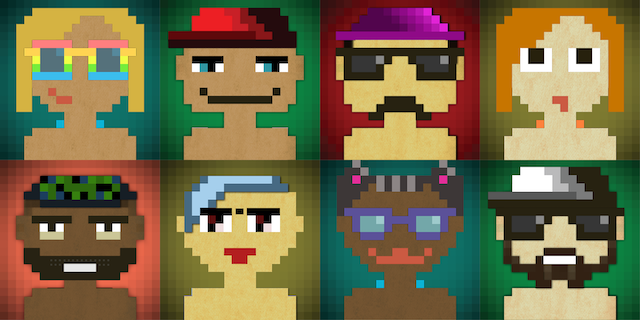
Pixitar is an avatar generator library written in Crystal. It allows for the generation of random avatars, as well as custom male or female avatars.

Inspired by 8biticon (author of the original image assets)
Installation
Add this to your application's shard.yml:
dependencies:
  pixitar:
    github: dcalixto/pixitar
Then run the following command to install the dependencies:
shards installUsage
Import the library
require "pixitar"Create an avatar generator
avatar = Pixitar::Avatar.newGenerate a random avatar (male or female)
To generate a random avatar:
avatar = Pixitar::Avatar.new.generate_avatarThis will generate a random male or female avatar and save it with an auto-generated filename (e.g., avatar_xfal_2741.png).
Generate male avatar with custom filename To generate a male avatar and save it to a specific filename:
avatar = Pixitar::Avatar.new.generate_avatar(:male, "avatar.png") # Saves as avatar.pngGenerate a female avatar with a custom filename To generate a female avatar and save it to a specific filename:
avatar = Pixitar::Avatar.new.generate_avatar(:female, "avatar_female.png") # Saves as avatar_female.png
Generate male or female avatars directly To generate male or female avatars directly:
avatar.male_avatar # Generates and saves a male avatar to an auto-generated filenameavatar.female_avatar # Generates and saves a female avatar to an auto-generated filenameWeb Server Usage To serve avatars via a web server:
Import the necessary libraries:
require "pixitar"
require "pixitar/web"
Run the web server:
Pixitar::Web.run
Access avatars via HTTP: You can generate and download avatars by making HTTP requests:
GET /avatar/male - Generate a male avatar
GET /avatar/female - Generate a female avatar
Example Web Server
require "pixitar"
require "pixitar/web"

Pixitar::Web.run
Development
To work on Pixitar locally, follow these steps: Install dependencies
shards install
Run tests
crystal spec
Contributing
- Fork it (https://github.com/dcalixto/pixitar/fork)
- Create your feature branch (
git checkout -b my-new-feature) - Commit your changes (
git commit -am 'Add some feature') - Push to the branch (
git push origin my-new-feature) - Create a new Pull Request
Contributors
Daniel Calixto - creator and maintainer
License
This shard is available as open source under the terms of the MIT License.