README
Build status: 


Fluence 0.6.1
Elegant wiki powered by Crystal, with markdown as native format and a WYSIWYG editor.
It uses file-based storage versioned using Git. Wiki pages are created as files and directories on disk and they can be modified in Fluence or via filesystem directly.
Fluence uses latest versions: Bootstrap 4.4.0, jQuery 3.4.1 slim, InscrybMDE 1.11.6.
Installation and Startup
Fluence is implemented in Crystal and you will need a Crystal compiler. Obtain it from https://crystal-lang.org/docs/installation/.
To download and compile Fluence, do:
git clone https://github.com/crystallabs/fluence
cd fluence
shards
bin/ameba      # Warnings reported here are non-critical
crystal spec
make           # or 'make release'
The result of the compilation will be one executable file — bin/fluence.
Run this file and visit http://localhost:3000/ in your browser.
To configure Fluence, please do so in config/options.cr. After changing the options, you need to rebuild Fluence.
Example
Here is how it currently looks:
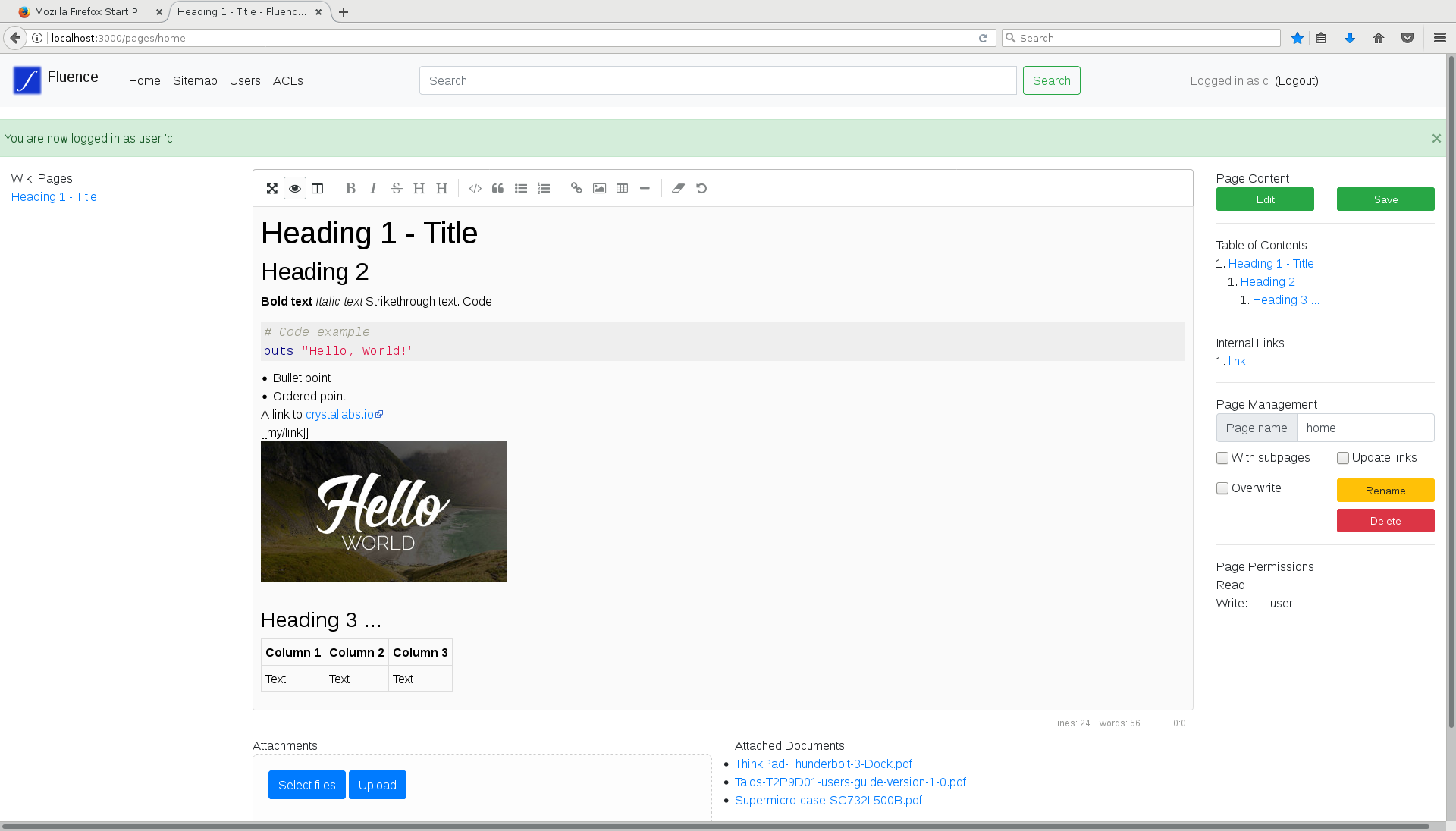
Maintenance Tips
When Fluence starts, by default it will create two subdirectories in the current directory:
data/(further subdivided intopages/andmedia/) for actual Wiki pages and their attached media filesmeta/for metadata, which currently consists of filesusers,acl,pages, andmedia
There are no files or directories required to pre-exist for Fluence to work. Feel free to delete any part of data or metadata as long as you restart Fluence after that.
Files meta/pages and meta/media contain indexes of pages and media content respectively. If you believe their contents have gone out of sync with the actual on-disk state (possibly due to a bug or external modifications to files which Fluence didn't auto-detect and update), delete these files and restart Fluence; the indices will be regenerated from actual on-disk contents.
Current State / Usability
The Fluence Wiki is usable. On-disk format for data won't change so you will be able to upgrade in the future without trouble.
Important things to have in mind currently:
- The default permissions scheme (which works and can be configured via both
meta/aclsand GUI) by default makes all registered users automatically be admin, and registrations are always open and don't require any confirmation. Therefore, the initial target for deployment and test of Fluence are small/trusted intranets and teams.
Things we have in mind or are working on are listed in project issues. Your comments will help us decide on priorities.