README
lightdark
Switch between macOS Light and Dark mode in iTerm!
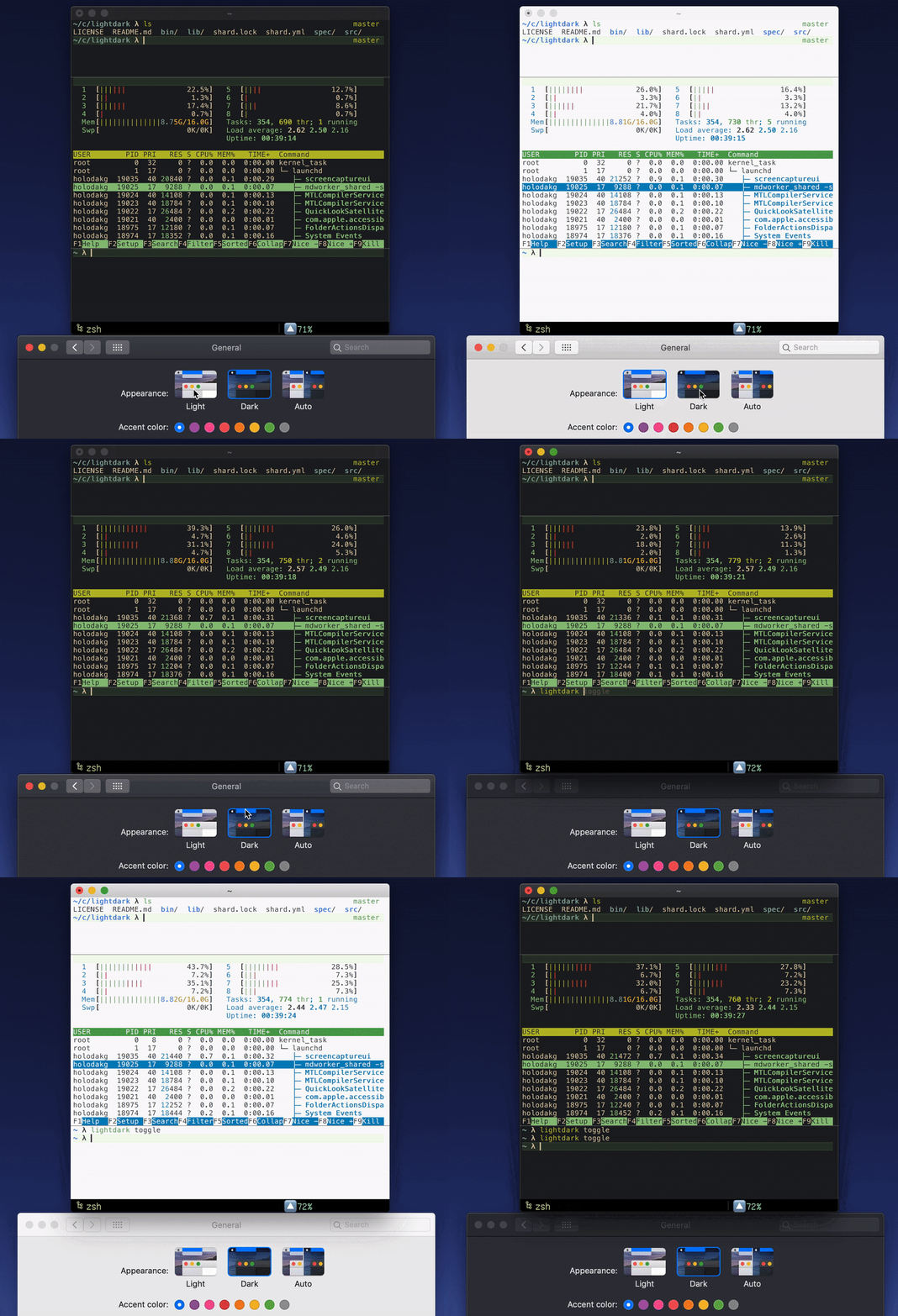
While lightdark is running, switching the system appearance will change the theme in all open terminals.
Requirements:
- iTerm2
- Base16 Shell
Inspiration: https://github.com/sindresorhus/swift-snippets/tree/master/DarkMode.playground
Works well with Shifty
Installation
lightdark requires crystal: brew install crystal
Then, clone this repository:
git clone https://github.com/keidax/lightdark.git
cd lightdark
Build the project:
shards build --releaseAnd optionally, install the binary somewhere on your PATH:
sudo cp ./bin/lightdark /usr/local/bin/lightdarkIf you want lightdark to automatically start when you log in, create a plist file like this at ~/Library/LaunchAgents/com.github.keidax.lightdark.plist:
<?xml version="1.0" encoding="UTF-8"?>
<!DOCTYPE plist PUBLIC "-//Apple//DTD PLIST 1.0//EN" "http://www.apple.com/DTDs/PropertyList-1.0.dtd">
<plist version="1.0">
<dict>
        <key>EnvironmentVariables</key>
        <dict>
                <key>BASE16_SHELL</key>
                <string>~/.config/base16-shell</string>
        </dict>
        <key>KeepAlive</key>
        <true/>
        <key>Label</key>
        <string>com.github.keidax.lightdark</string>
        <key>ProgramArguments</key>
        <array>
                <string>/usr/local/bin/lightdark</string>
                <string>serve</string>
        </array>
        <key>RunAtLoad</key>
        <true/>
</dict>
</plist>
Usage
Use lightdark serve to run the lightdark daemon.
To configure the themes, use environment variables:
| Variable | Default |
|---|---|
| LIGHTDARK_DARK_THEME | gruvbox-dark-hard |
| LIGHTDARK_LIGHT_THEME | one-light |
lightdark toggle can be used to switch the system appearance from any terminal, as an alternative to System Preferences.
Use mesg n if you want to stop receiving theme changes in a particular terminal.
Use mesg y to resume.
Development
TODO: Write development instructions here
Contributing
- Fork it (https://github.com/keidax/lightdark/fork)
- Create your feature branch (
git checkout -b my-new-feature) - Commit your changes (
git commit -am 'Add some feature') - Push to the branch (
git push origin my-new-feature) - Create a new Pull Request
Contributors
- Gabriel Holodak - creator and maintainer