README

Medup




Sync all content from Medium or Dev.to with local folder via API
Table of Contents
Usage
Export post
Export a single medium post to local
medup https://medium.com/notes-and-tips-in-full-stack-development/medup-backups-articles-8bf90179b094Export a single dev.to post to local
medup https://dev.to/jetthoughts/the-trial-period-for-staff-augmentation-in-jetthoughts-1h5cAuthor's posts
Export all articles written by single author to special folder posts/miry
medup -u miry -d posts/miryAlternative:
medup @miry -d posts/mirySimilar for Dev.to
medup --platform=devto @miry
medup --platform=devto -u miry
medup https://dev.to/miry
User's recommendations
Export all articles recommended by miry:
medup -u miry -d posts/recommendations -rAlternative:
medup @miry -d posts/recommendations -rPublication's posts
Export all articles written by single author to special folder posts/miry
medup -p jetthoughts -d posts/jetthoughtsAlternative:
medup jetthoughts -d posts/jetthoughtsSimilar for Dev.to
medup --platform=devto jetthoughts
medup --platform=devto -p jetthoughts
medup https://dev.to/jetthoughts
Assets
By default all images are embedded in the article.
It is possible to save images in separate folder with arguments - --assets-images
$ medup @miry --assets-images -d posts/miry
$  $ tree posts/miry
posts/miry
├── 2017-03-20-war-with-ads-and-trackers.md
├── 2017-03-26-setup-k8s-v1-6-0-rc-1-cluster.md
├── 2017-03-28-docker-network-performance.md
...
└── assets
    ├── 0*BmauN6EER-PdvCee.jpeg
    ├── 0*FbFs8aNmqNLKw4BM.jpeg
    ├── 0*LZaURw4xtfA74nu9.jpeg
...
Specify assets directory
To make it is even more agile and work with Jekyl, put assets in different directory - --assets-dir=DIR
$ medup @miry --assets-images -d site/posts --assets-dir=site/assets
$ tree site
site
├── assets
│   ├── 0*BmauN6EER-PdvCee.jpeg
│   ├── 0*FbFs8aNmqNLKw4BM.jpeg
│   ├── 0*LZaURw4xtfA74nu9.jpeg
...
└── posts
    ├── 2017-03-20-war-with-ads-and-trackers.md
    ├── 2017-03-26-setup-k8s-v1-6-0-rc-1-cluster.md
    ├── 2017-03-28-docker-network-performance.md
...
Specify assets base path
Also change the path in the document to find assets with --assets-base-path=URI.
Default base path is ./assets/ASSET_NAME.XXX. Example image: .
With --assets-base-path=/static the src would be /static/ASSET_NAME.XXX.
Example image: .
$ medup @miry --assets-images -d tmp/posts --assets-dir=tmp/static --assets-base-path=/staticENVIRONMENT
- MEDUP_GITHUB_API_TOKEN Use this GitHub personal access token when accessing the GitHub Gist.
Mix
The neat feature to mix mutliple rules in single command
medup -u miry @pftg -p jetthoughts notes-and-tips-in-full-stack-development \
      https://medium.com/notes-and-tips-in-full-stack-development/medup-backups-articles-8bf90179b094 \
      https://dev.to/jetthoughts \
      https://dev.to/jetthoughts/the-trial-period-for-staff-augmentation-in-jetthoughts-1h5c
It would download all articles for:
- user
@miry - user
@pftg - publication
jetthoughts - publication
notes-and-tips-in-full-stack-development - single post "Medup backups articles"
- publication
jetthoughtsfrom dev.to - single post "The Trial Period for Staff Augmentation in JetThoughts" from dev.to
Features
- Discover all articles from user account available in public
- Allow to download all recommended articles by user
- Discover all articles from publisher, that available in public
- Download images used inside article or in
assetsfolder - Save posts in markdown format
- Convert a single article in markdown format
- Extract gists and convert to code blocks
Getting Started
Homebrew
Install medup tool to the MacOS or Linux via Hombrew:
$ brew tap miry/medup
$ brew install medup
Run export command for Medium author miry and save articles to local folder:
$ medup -u miry -d .
$ medup -d . https://medium.com/notes-and-tips-in-full-stack-development/medup-backups-articles-8bf90179b094
Docker
Docker way to make same job:
$ docker run -v <path to local articles folder>:/posts -it miry/medup -u <user>Download all articles that user has recommended:
$ docker run -v <path to local articles folder>:/posts -it miry/medup -u <user> --recommended -d posts/recommendedCrystal
Run dumping with source code
$ shards install
$ crystal run src/cli.cr -- -u <medium user> -d <destination folder>
Example download all posts from author https://medium.com/@miry to local folder posts/miry
$ crystal run src/cli.cr -- -u miry -d posts/miryBuild
Build a application binary and execute:
$ shards install
$ rake build
$ _output/medup -u <medium user> -d <destination folder>
Result
By default all articles destination folder is posts.
In the directory, you can find 2 format of files: .json and .md.
- JSON format is the raw, what Medium returns.
- Markdown format is simple implementation of block formated text.
Images encoded in the result document.
Rich elements content are located in posts/assets and integrated with <IFRAME>.
Markdown
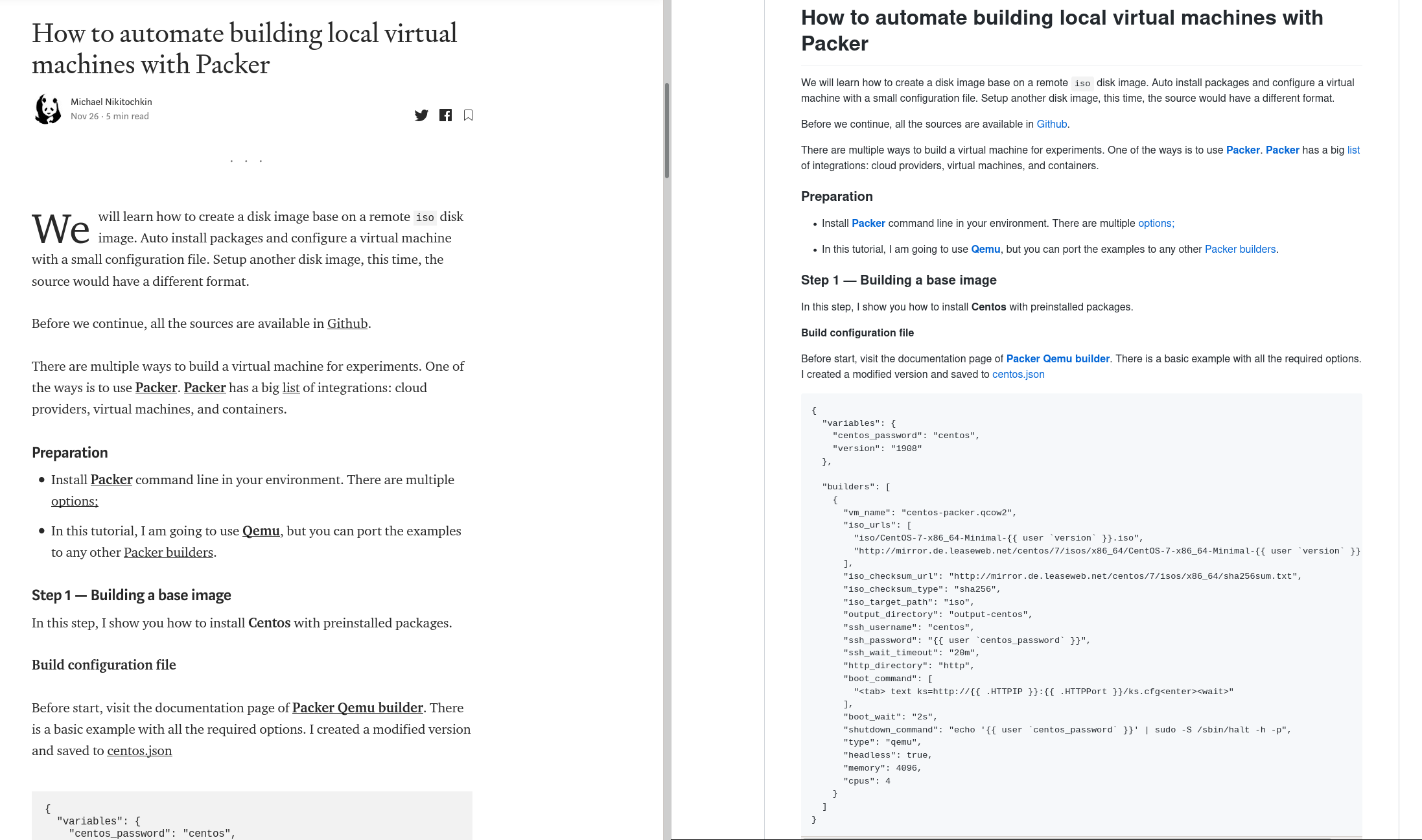
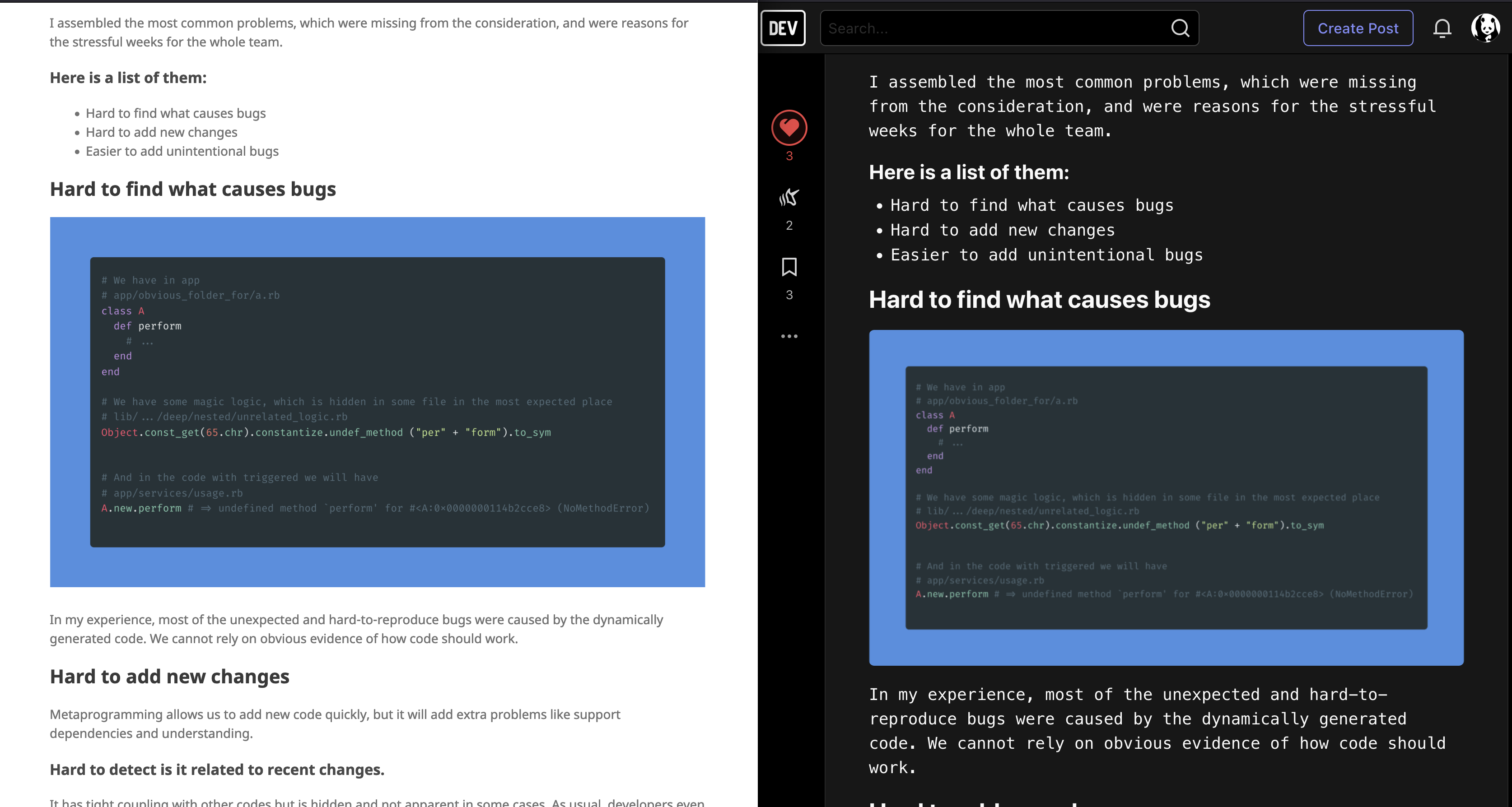
Example of exported document.
- Original Medium post vs Exported Markdown:
- Exported Markdown in Github pages vs original Dev.to
Demo
There are possible solution to test export markdown files. Run a test Jekyll server with posts. Example:
$ rake demo:serveAnd after it finishes you can test http://localhost:4000. Update posts for demo:
$ medup -v7 -d demo/_posts/ --assets-dir=demo/assets --assets-base-path=/assets <url>|<@user>|<publisher>Test Bridgetown use next command:
$ rake demo:bridgetown:serveBridgetown has a bit different structure for posts. Use to update posts:
$ medup -v7 -d demo/src/_posts/ --assets-dir=demo/src/assets --assets-base-path=/assets <url>|<@user>|<publisher>Contributing
- Fork it ( https://github.com/miry/medup/fork )
- Create your feature branch (git checkout -b my-new-feature)
- Commit your changes (git commit -am 'Add some feature')
- Push to the branch (git push origin my-new-feature)
- Create a new Pull Request
Contributors
- @miry Michael Nikitochkin - creator, maintainer
- @alexanderadam Alexander - supporter
- @clawfire Thibault Milan - supporter
License
This project is under the LGPL-3.0 license.
Play ownself
FAQ
- Clean unused assets:
$ for i in $(ls -1 assets/*); do grep -q "$i" *.md || echo $i; done | xargs rm- Detect potential articles with IFRAME content for gists:
$ for i in $(ls -1 assets/*.html); do grep "gist.github.com" -q $i && grep -n "$i" *.md; done- Detect potential articles' url with IFRAME content for gists:
$ for i in $(ls -1 assets/*.html); do grep "gist.github.com" -q $i && (grep -l "$i" *.md | xargs head | grep url); done- Detect potential articles' url with IFRAME content for youtube:
$ for i in $(ls -1 assets/*.html); do grep "schema=youtube" -q $i && (grep -l "$i" *.md | xargs head | grep url); doneMedium API
-
Generate token on the page https://medium.com/me/settings
-
Create environment variable
MEDIUM_TOKEN=<token> -
Verify token with sample query:
$ curl -H "Authorization: Bearer <token>" https://api.medium.com/v1/me
{"data":{"id":"number","username":"miry","name":"Michael Nikitochkin","url":"https://medium.com/@miry","imageUrl":"https://cdn-images-1.medium.com/fit/c/400/400/0*KgbjgGnH-csHuB8j."}}
Crawler
- Check public information not covered by API
$ curl "https://medium.com/@miry?format=json" | cut -c17- && : Remove in the front from response some strange JS code.- Pagination
$ curl "https://medium.com/@miry/latest?format=json&limit=100" | cut -c17- && : Remove in the front from response some strange JS code.- Post info
curl -s -H "Content-Type: application/json" https://medium.com/@miry/c35b40c499e\?format\=json\&limit\=100- Stream
$ curl -s -H "Content-Type: application/json" "https://medium.com/_/api/users/fdf238948af6/profile/stream?source=overview" | cut -c17-
$ curl -s -H "Content-Type: application/json" "https://medium.com/_/api/users/fdf238948af6/profile/stream?limit=100&page=3" | cut -c17- > stream.json
$ cat stream.json| jq ".payload.references.Post[].title"
$ cat stream.json| jq ".payload.paging.next"- Recommendations
$ curl -s -H "Content-Type: application/json" https://medium.com/@miry/has-recommended | cut -c17-
$ curl -s -H "Content-Type: application/json" "https://medium.com/_/api/users/fdf238948af6/profile/stream?source=has-recommended" | cut -c17-