markterm
Version, currently 0.3.017 versions
- 0.8.1latestFeb 20, 2026
- 0.8.0not indexedFeb 20, 2026
- 0.7.0not indexedFeb 20, 2026
- 0.6.3not indexedFeb 20, 2026
- 0.6.2not indexedFeb 20, 2026
- 0.6.1not indexedFeb 20, 2026
- 0.6.0not indexedFeb 20, 2026
- 0.5.2not indexedFeb 20, 2026
- 0.5.1not indexedFeb 20, 2026
- 0.5.0not indexedFeb 20, 2026
- 0.4.0not indexedFeb 20, 2026
- 0.3.3not indexedFeb 20, 2026
- 0.3.2not indexedFeb 20, 2026
- 0.3.1not indexedFeb 20, 2026
- 0.3.0not indexedFeb 20, 2026
- 0.2.0not indexedFeb 20, 2026
- 0.1.0not indexedFeb 20, 2026
github.com/ralsina/markterm
No description declared in shard.yml.
15 stars
0 dependents
License: MIT
Nothing has been indexed for 0.3.0 yet. The tag is recorded, its shard.yml has not been read, so the manifest and dependency list below are empty because they are unknown rather than because they are absent.
Installation
# Add this to your shard.yml
dependencies:
  markterm:
    github: ralsina/markterm
    version: ~> 0.3.0
Then run:
shards installshard.yml
No shard.yml has been indexed for 0.3.0. You can read it on the repository.
Dependencies
Unknown: the shard.yml for this version has not been read yet.
README
This README is the one indexed from the repository at its latest ref, not from the tag for this version.
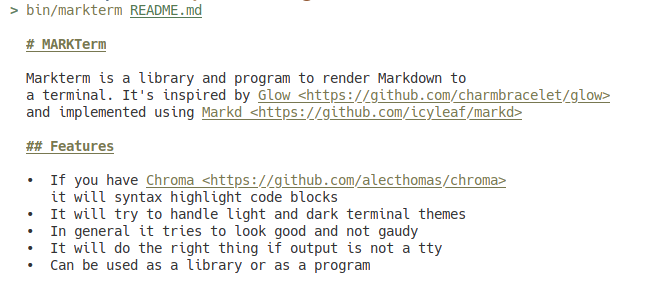
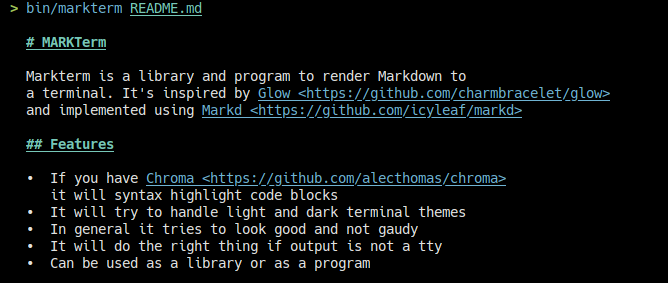
# MARKTerm
Markterm is a library and program to render Markdown to
a terminal. It's inspired by [Glow](https://github.com/charmbracelet/glow)
and implemented using [Markd](https://github.com/icyleaf/markd)
It can also render Markdown to Markdown if you really need that :-)
## Features
* It will syntax highlight code blocks
* It will try to handle light and dark terminal themes. Since
it uses the terminal's colors, it should match things like
vs code themes in the vs code terminal, etc.
* In general it tries to look good and not gaudy
* It will do the right thing if output is not a tty
* Can be used as a library or as a program
## TODO
* ✅ Configurable themes
* ✅ Implement HTML-style links as supported in kitty/alacritty
* ✅ Don't break paragraphs on soft breaks
* ✅ Implement images as supported in kitty (requires timg, kinda buggy)
* ✅ Images in all terminals (requires catimg, kinda useless)
* ✅ Implement HTML block support
* ✅ Better textual image display when images are not supported
* ✅ Maybe only support timg with options
* ✅ Support being used in a pipeline
* Implement internal piping to $PAGER
* Allow enabling/disabling images/html-style-links via CLI (partly done)
* Use crystal-term/color to detect color capabilities
* Fix whatever bug is there
## Usage as a program
Either get a static binary from the [releases page](https://github.com/ralsina/markterm/releases)
or build from source:
* Install crystal
* Checkout the repo
* run `shards build`
This is the help:
```docopt
Markterm - A tool to render markdown to the terminal
Usage:
markterm <file> [-t <theme>][--code-theme <code-theme>][-l]
markterm -h | --help
markterm --version
Options:
-h --help Show this screen.
-t <theme> Theme to use for coloring output
--code-theme <code-theme> Theme to use for coloring code blocks
--version Show version.
-l Force html-like links
If you use "-" as the file argument, markterm will read from stdin.
```
There is a similar `markmark` binary that will render markdown to markdown.
## Usage as a library
1. Add the dependency to your `shard.yml`:
```yaml
dependencies:
markterm:
github: ralsina/markterm
```
In your code, use it like this:
```crystal
puts Markd.to_term(source)
puts Markd.to_md(source)
```
## Contributing
1. Fork it (<https://github.com/ralsina/markterm/fork>)
2. Create your feature branch (`git checkout -b my-new-feature`)
3. Commit your changes (`git commit -am 'Add some feature'`)
4. Push to the branch (`git push origin my-new-feature`)
5. Create a new Pull Request
## Contributors
* [Roberto Alsina](https://github.com/ralsina) - creator and maintainer
Documentation
Built from the current release. The first visit to a release nobody has asked for starts its build.
Links
This release
- Version
0.3.0- Tagged
- Feb 20, 2026
- Commit
dffd072ff503- Indexed
- not yet
Dependents
No indexed shard depends on this one yet.
Repository
github.com/ralsina/markterm
Metadata
- Created
- Aug 12, 2026
- Updated
- Aug 13, 2026
- Synced
- Aug 13, 2026
- Versions
- 17