README
crolorama
Easy text coloring and styling in Crystal. Currently only support for systems with ANSI support.
Tested only on Linux.
Installation
-
Add the dependency to your
shard.yml:dependencies: crolorama: github: simplylu/crolorama -
Run
shards install
Usage
require "crolorama"
crol = Crolorama::Color.new

puts "This is #{crol.fg("red")}RED#{crol.reset}"
Available methods
- Change foreground color:
crol.fg - Change background color:
crol.bg - Change text style:
crol.style - Reset colors:
crol.reset - Reset all (including styles):
crol.reset_all
Experimental
- Move cursor n lines up:
crol.up n - Move cursor n lines down:
crol.down n - Move cursor n lines forward:
crol.forward n - Move cursor n lines back:
crol.back n - Position cursor at x across, y down:
crol.pos x, y
Example: crystal run src/example.cr
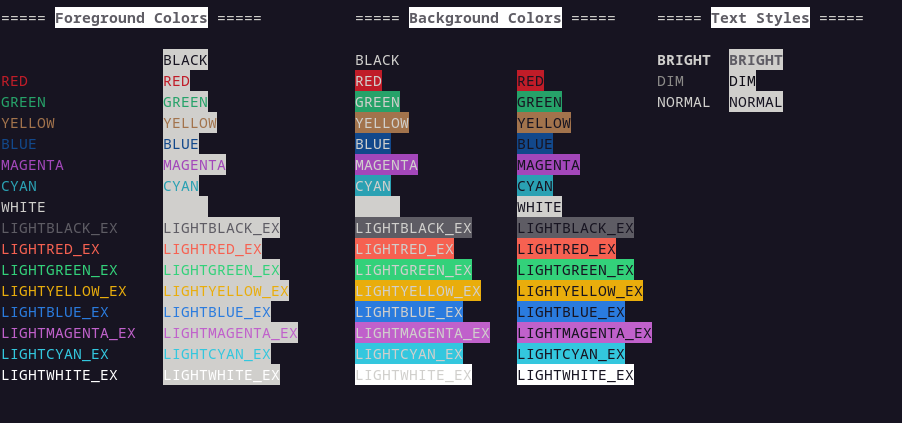
Available colors: crystal run src/colors.cr
Development
This shard is mainly oriented towards the colorama module of python. In case you wanna add new features, see Contributing.
Contributing
- Fork it (https://github.com/simplylu/crolorama/fork)
- Create your feature branch (
git checkout -b my-new-feature) - Commit your changes (
git commit -am 'Add some feature') - Push to the branch (
git push origin my-new-feature) - Create a new Pull Request
Contributors
- simplylu - creator and maintainer