README
omegga-raytracer-cr
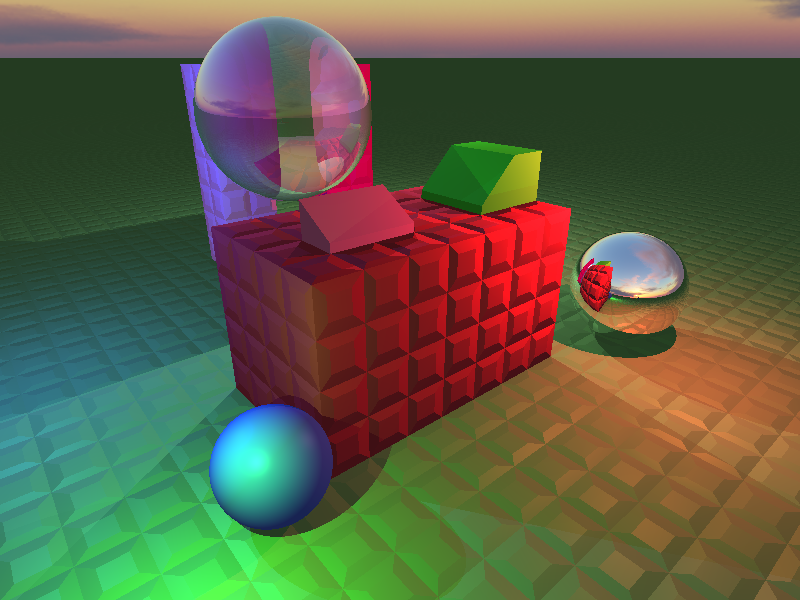
This Omegga plugin acts as a basic raytracer. It allows you to capture small scenes in your Brickadia server and render them out to bricks or an image.
This project started in JavaScript, featuring raytracing features like shadows, reflections, and basic diffuse lighting. Since, I have reimplemented the entire raytracer in Crystal and added more features like refractions, lighting, Blinn-Phong shading, meshes, materials, textures, skyboxes, and more. The above screenshot is a sample raw output from the raytracer demonstrating some of these features.
Practicality
This raytracer is highly experimental, and I would not suggest it for real use. It is feasible to render small scenes of less than 1,000 bricks with a few lights, but it is highly unoptimized and does exactly what you tell it to. Be careful rendering massive scenes.
Installation
First, install Crystal. Then,
omegga install gh:voximity/raytracer-cr
Multithreading
To enable multithreading, you can edit your omegga_plugin to be the following:
#!/bin/bash
cd plugins/omegga-raytracer-cr
shards build -q -Dpreview_mt && CRYSTAL_WORKERS=N ./bin/omegga-raytracer-cr
where N is the amount of workers (cores/threads) you'd like to allocate to the raytracer.
Usage
TODO: this
Contributing
- Fork it (https://github.com/voximity/omegga-raytracer-cr/fork)
- Create your feature branch (
git checkout -b my-new-feature) - Commit your changes (
git commit -am 'Add some feature') - Push to the branch (
git push origin my-new-feature) - Create a new Pull Request