README
This README is the one indexed from the repository at its latest ref, not from the tag for this version.
oij

oij は online-judge-tools を URL の指定なしで使えるようにしたコマンドです。
内部で online-judge-tools と online-judge-api-client を使用しています。
インストール
ビルド済みバイナリから
リリースページ から oij-vA.B.C-Linux か oij-vA.B.C-maxOS をダウンロードしてください。
また、online-judge-tools のインストールが必要です。
ソースから
online-judge-tools と Crystal のインストールが必要です。
$ cd <your favorite directory>
$ git clone https://github.com/yuruhi/oij.git && cd oij
$ shards build --release
$ cp bin/oij <your favorite bin>
使い方
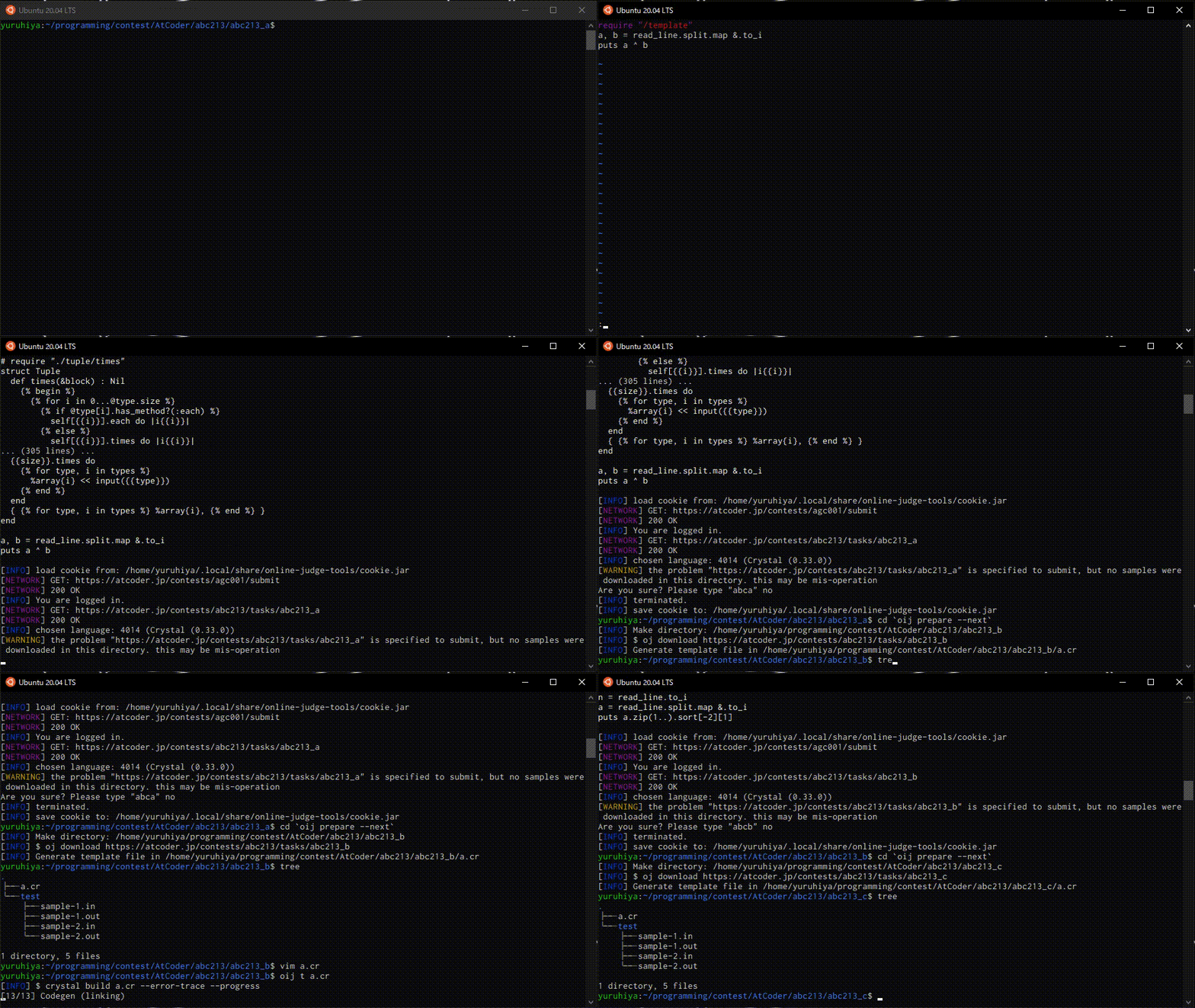
oij の設定は ~/.config/oij/config.yml で行えます。
コマンド一覧
compile: 与えられたファイルをコンパイルします。exe: 与えられたファイルを実行します。run:compileとexeを実行します。test: 与えられたファイルをテストします。t: 与えられたファイルをコンパイルしてからテストします。edit-test,et: 与えられたテストケースを作成してエディターで開きます。print-test,pt: 与えられたテストケースの内容を表示します。url: 与えられた問題の URL を表示します。url-contest,urlc: 与えられたコンテストの URL を表示します。dir: 与えられた問題のディレクトリ名を表示します。dir-contest,dirc: 与えられたコンテストのディレクトリ名を表示します。bundle: 与えられたファイルを設定されたコマンドを使って展開します。submit,s: 与えられたファイルを現在のディレクトリに対応する問題に提出します。download,d: 与えられた問題の入出力例をその問題に対応するディレクトリにダウンロードします。download-contest,dc: 与えられたコンテストの各問題の入出力例をその問題に対応するディレクトリにダウンロードします。template: 現在のディレクトリにテンプレートを生成します。prepare,p: 与えられた問題についてテストケースのダウンロードとテンプレートの生成をします。prepare-contest,pc: 与えられたコンテストの各問題についてprepareを実行します。generate-input,gi: 入力をランダムに生成するプログラムを受け取って、テストケースの入力を生成します。generate-output,go:generate-inputで生成したテストケースを解くプログラムを受け取って、テストケースの出力を生成します。hack: 間違っているプログラム、入力を生成するプログラム、出力を生成するプログラムを受け取ってハックケースを生成します。
compile, exe, run
与えられたファイルを compile はコンパイル、exe は実行、run はコンパイルして実行します。
exe, run は第二引数に入力ファイルを指定できます。input_file_mappingが使えます。
一つの言語で複数のコンパイル・実行するコマンドを使う場合は --option, -o で切り替えられます。
compile にコンパイルするコマンド、実行するコマンドを拡張子別に設定します。(変数が使えます)
# config.yml
compile:
    cr:
        default: "crystal build ${file}"
        release: "crystal build ${file} --release"
    cpp:
        debug: "g++ -g -fsanitize=undefined,address ${file}"
        fast: "g++ -O3 ${file}"
    rb: "ruby -wc ${file}"

execute:
    cr: "./${basename_no_extension}"
    cpp: "./a.out"
    rb: "ruby ${file}"
# a.cr
puts read_line.to_i * 2$ oij compile a.cr # same to `oij compile a.cr -o default`
[INFO] $ crystal build a.cr
$ oij compile a.cr -o release
[INFO] $ crystal build a.cr --release
$ cat input
3
$ oij exe a.cr
[INFO] $ ./a
5 # input
10 # output
$ oij exe a.cr input
[INFO] $ ./a (input file: input)
6
$ oij run a.cr input
[INFO] $ crystal build a.cr
[INFO] $ ./a (input file: input)
6test, t
test は与えられたファイルをテスト、t は与えられたファイルをコンパイルしてからテストします。
-- の後のオプションはそのまま oj test に渡されます。
$ oij compile a.cr
[INFO] $ crystal build a.cr

$ oij test a.cr
[INFO] $ oj test -c ./a
...

$ oij t a.cr
[INFO] $ crystal build a.cr
[INFO] $ oj test -c ./a
...

$ oij test a.cr -- -e=1e-5
[INFO] $ oj test -c ./a -e=1e-5
...edit-test, et
与えられたテストケース(testcase_mappingが使えます)をエディターで開きます。
--dir, -d でテストケースが入ったディレクトリを指定できます(デフォルト: test)。
使用するエディターは editor で設定します。指定されていない場合は環境変数 EDITOR を使います。
コマンドにスペースが含まれる場合、引数を表す "${@}" を含める必要があります。
# config.yml
editor: "vim"
$ et sample-1
[INFO] $ vim test/sample-1.in test/sample-1.out
$ et sample-1 -d sample
[INFO] $ vim sample/sample-1.in sample/sample-1.outprint-test, pt
与えられたテストケース(testcase_mappingが使えます)を表示します。
--dir, -d でテストケースが入ったディレクトリを指定できます(デフォルト: test)。
表示に使用するコマンドは printer で設定することもできます。
コマンドにスペースが含まれる場合、引数を表す "${@}" を含める必要があります。
$ pt sample-1
[INFO] test/sample-1.in (2 byte):
3

[INFO] test/sample-1.out (2 byte):
6
# config.yml
printer: 'bat --style=header "${@}"'[INFO] $ /bin/sh -c bat --style=header "${@}" -- test/sample-1.in test/sample-1.out
File: test/sample-1.in
3 6
File: test/sample-1.out
5url, url-contest, urlc
$ oij url --atcoder agc001_a
https://atcoder.jp/contests/agc001/tasks/agc001_a

$ oij url-contest --atcoder agc001
https://atcoder.jp/contests/agc001dir, dir-contest, dirc
与えられた問題、コンテストに対応するディレクトリを表示します。
各サービスに対応するディレクトリ(絶対パス)は path で設定します。
| 問題の URL | 対応するディレクトリ |
| ------------------------------------------------------------ | --------------------------------------- |
| https://atcoder.jp/contests/{contest}/tasks/{problem} | path[atcoder]/{contest}/{problem}/ |
| https://yukicoder.me/problems/no/{number} | path[yukicoder]/{number}/ |
| https://codeforces.com/contest/{contest}/problem/{problem} | path[codeforces]/{contest}/{problem}/ |
# config.yml
path:
    atcoder: "~/contest/AtCoder"
    yukicoder: "~/contest/yukicoder"
    codeforces: "~/contest/Codeforces"
$ oij dir --atcoder agc001_a
/home/user/contest/AtCoder/agc001/agc001_a
$ oij dir-contest --atcoder agc001_a
/home/user/contest/AtCoder/agc001bundle
設定されたコマンドに、与えられたファイルを渡して実行します。
コマンドは bundler で拡張子ごとに指定します(変数が使えます)。
ファイル分割されたプログラムを一つのファイルに展開するコマンド(C++ の場合は oj-bundle など)を指定することが想定されています。
bundler:
    cr: "cr-bundle ${file}"
cpp: "oj-bundle -I path/to/your/library ${file}"submit, s
与えられたファイルを現在のディレクトリに対応する問題に提出します。
bundler が設定されている場合はそのコマンドが出力した内容が提出されます。
/home/user/contest/AtCoder/agc001/agc001_a$ oij s a.rb
[INFO] $ oj submit https://atcoder.jp/contests/abc213/tasks/abc213_a a.rb
...

/home/user/contest/AtCoder/agc001/agc001_a$ oij s a.cr
[INFO] $ cr-bundle a.cr
[INFO] $ oj submit https://atcoder.jp/contests/abc213/tasks/abc213_a /tmp/bundled.e3lK5W.cr
...download, d
与えられた問題の入出力例をその問題に対応するディレクトリにダウンロードします。
-- の後のオプションはそのまま oj download に渡されます。
/home/user/contest/AtCoder/agc001/agc001_a$ oij d
[INFO] $ oj download https://atcoder.jp/contests/agc001/tasks/agc001_a

/home/user/contest/AtCoder/agc001/agc001_a$ oij d --atcoder agc001_b
[INFO] $ oj download https://atcoder.jp/contests/abc213/tasks/abc213_b # at /home/user/contest/AtCoder/agc001/agc001_bdownload-contest, dc
与えられたコンテストの各問題の入出力例をその問題に対応するディレクトリにダウンロードします。
--silent, -s で oj download の出力を非表示にできます。
-- の後のオプションはそのまま oj download に渡されます。
$ oij dc --atcoder abc005 -s
[INFO] Download https://atcoder.jp/contests/abc005/tasks/abc005_1 in /home/user/programming/contest/AtCoder/abc005/abc005_1
[INFO] Make directory: /home/user/programming/contest/AtCoder/abc005/abc005_1
[INFO] $ oj download https://atcoder.jp/contests/abc005/tasks/abc005_1  > /dev/null

[INFO] Download https://atcoder.jp/contests/abc005/tasks/abc005_2 in /home/user/programming/contest/AtCoder/abc005/abc005_2
[INFO] Make directory: /home/user/programming/contest/AtCoder/abc005/abc005_2
[INFO] $ oj download https://atcoder.jp/contests/abc005/tasks/abc005_2  > /dev/null

[INFO] Download https://atcoder.jp/contests/abc005/tasks/abc005_3 in /home/user/programming/contest/AtCoder/abc005/abc005_3
[INFO] Make directory: /home/user/programming/contest/AtCoder/abc005/abc005_3
[INFO] $ oj download https://atcoder.jp/contests/abc005/tasks/abc005_3  > /dev/null

[INFO] Download https://atcoder.jp/contests/abc005/tasks/abc005_4 in /home/user/programming/contest/AtCoder/abc005/abc005_4
[INFO] Make directory: /home/user/programming/contest/AtCoder/abc005/abc005_4
[INFO] $ oj download https://atcoder.jp/contests/abc005/tasks/abc005_4  > /dev/null
template
現在のディレクトリに --ext, -e で指定された言語(指定されなかった場合はすべて)のテンプレートを生成します。
テンプレートファイルを指定されたファイル名にそのままコピーします。
テンプレートファイル(絶対パス)とファイル名は template に拡張子ごとに指定します。
template:
    cr: ["~/.config/oij/template.cr", "a.cr"]
    cpp: ["~/.config/oij/template.cpp", "a.cpp"]
$ oij template -e cr
[INFO] Generate template file in {current path}/a.cr # a.cr is same to template.cr
$ oij template # same to oij `template -e cr -e cpp`
[INFO] Generate template file in {current path}/a.cr # a.cr is same to template.cr
[INFO] Generate template file in {current path}/a.cpp # a.cpp is same to template.cppprepare, p
与えられた問題に対して download と template を実行して、最後に問題の URL を出力します。
-- の後のオプションはそのまま oj download に渡されます。
/home/user/contest/AtCoder/abc213$ oij p --atcoder abc213_a
[INFO] $ oj download https://atcoder.jp/contests/abc213/tasks/abc213_a  > /dev/null
[INFO] Generate template file in /home/user/programming/contest/AtCoder/abc213/abc213_a/a.cr
/home/user/programming/contest/AtCoder/abc213/abc213_a

/home/user/contest/AtCoder/abc213$ cd `oij p --atcoder abc213_a`
[INFO] $ oj download https://atcoder.jp/contests/abc213/tasks/abc213_a  > /dev/null
[INFO] Generate template file in /home/user/programming/contest/AtCoder/abc213/abc213_a/a.cr

/home/user/contest/AtCoder/abc213/abc213_a$ ls
a.cr testprepare-contest, pc
与えられたコンテストの各問題について prepare を実行します。
-- の後のオプションはそのまま oj download に渡されます。
$ oij pc --atcoder abc006
[INFO] Prepare https://atcoder.jp/contests/abc006/tasks/abc006_1 in /home/user/programming/contest/AtCoder/abc006/abc006_1
[INFO] Make directory: /home/user/programming/contest/AtCoder/abc006/abc006_1
[INFO] $ oj download https://atcoder.jp/contests/abc006/tasks/abc006_1  > /dev/null
[INFO] Generate template file in /home/user/programming/contest/AtCoder/abc006/abc006_1/a.cr

[INFO] Prepare https://atcoder.jp/contests/abc006/tasks/abc006_2 in /home/user/programming/contest/AtCoder/abc006/abc006_2
[INFO] Make directory: /home/user/programming/contest/AtCoder/abc006/abc006_2
[INFO] $ oj download https://atcoder.jp/contests/abc006/tasks/abc006_2  > /dev/null
[INFO] Generate template file in /home/user/programming/contest/AtCoder/abc006/abc006_2/a.cr

[INFO] Prepare https://atcoder.jp/contests/abc006/tasks/abc006_3 in /home/user/programming/contest/AtCoder/abc006/abc006_3
[INFO] Make directory: /home/user/programming/contest/AtCoder/abc006/abc006_3
[INFO] $ oj download https://atcoder.jp/contests/abc006/tasks/abc006_3  > /dev/null
[INFO] Generate template file in /home/user/programming/contest/AtCoder/abc006/abc006_3/a.cr

[INFO] Prepare https://atcoder.jp/contests/abc006/tasks/abc006_4 in /home/user/programming/contest/AtCoder/abc006/abc006_4
[INFO] Make directory: /home/user/programming/contest/AtCoder/abc006/abc006_4
[INFO] $ oj download https://atcoder.jp/contests/abc006/tasks/abc006_4  > /dev/null
[INFO] Generate template file in /home/user/programming/contest/AtCoder/abc006/abc006_4/a.crgenerate-input, gi
入力をランダムに生成するプログラムを受け取って、テストケースの入力を生成します。
第二引数で生成するテストケースの数を指定できます(デフォルト: 100)。
一つの言語で複数のコンパイル・実行するコマンドを使う場合は --option, -o で切り替えられます。
-- の後のオプションはそのまま oj generate-input に渡されます。
$ oij gi generate.cr
[INFO] $ crystal build generate.cr
[INFO] $ oj generate-input ./generate 100
...

$ oij gi generate.cr 10 -- -d=dir
[INFO] $ crystal build generate.cr
[INFO] $ oj generate-input ./generate 10 -d=dir
...generate-output, go
generate-input で生成したテストケースを解くプログラムを受け取って、テストケースの出力を生成します。
一つの言語で複数のコンパイル・実行するコマンドを使う場合は --option, -o で切り替えられます。
-- の後のオプションはそのまま oj generate-output に渡されます。
$ oij go solve.cr
[INFO] $ crystal build solve.cr
[INFO] $ oj generate-output -c ./solve
...

$ oij go solve.cr -- -d=dir
[INFO] $ crystal build solve.cr
[INFO] $ oj generate-output -c ./solve -d=dir
...
hack
間違っているプログラム 、入力を生成するプログラム、出力を生成するプログラムを受け取ってハックケースを生成します。 一つの言語で複数のコンパイル・実行するコマンドを使う場合は
- 間違っているプログラムは
--hack-option,-h - 入力を生成するプログラムは
--generator-option,-g - 出力を生成するプログラムは
--solver-option,-s
で切り替えられます。また、全てのプログラムに適用したい場合は --option, -o を使います。
-- の後のオプションはそのまま oj generate-input に渡されます。
$ oij hack a.cr generate.cr solve.cr
[INFO] $ crystal build a.cr
[INFO] $ crystal build generate.cr
[INFO] $ crystal build solve.cr
[INFO] $ oj generate-input --hack-expected ./solve --hack ./a ./generate
...
複数のファイルをコンパイルするので、ファイル名によって生成する実行ファイルの名前を変えないと壊れることに注意してください。
# config.yml
compile:
    cpp:
        default: "g++ ${file}"
        hack: "g++ ${file} -o ${basename_no_extension}"

execute:
    cpp:
        default: "./a.out"
        hack: "./${basename_no_extension}"
$ oij hack a.cpp generate.cpp solve.cpp
[INFO] $ g++ a.cpp
[INFO] $ g++ generate.cpp
[INFO] $ g++ solve.cpp
[INFO] $ oj generate-input --hack-expected ./a.out --hack ./a.out ./a.out
(壊れる)
$ oij hack a.cpp generate.cpp solve.cpp -o hack
[INFO] $ g++ a.cpp -o a
[INFO] $ g++ gene.cpp -o gene
[INFO] $ g++ solve.cpp -o solve
[INFO] $ oj generate-input --hack-expected ./solve --hack ./a ./generate
...変数
/home/user/directory で dir/file.ext が渡されたとすると以下のように置き換えられます。
| 変数 | 内容 |
| -------------------------- | ----------------------------------- |
| ${file} | dir/file.ext |
| ${basename} | file.ext |
| ${dirname} | dir |
| ${basename_no_extension} | file |
| ${relative_file} | /home/user/directory/dir/file.ext |
| ${relative_dirname} | /home/user/directory/dir |
問題の指定
オプションがない場合は現在のディレクトリに対応する問題が指定されたとみなされます。
--url: URL を指定--atcoder,-a: AtCoder の問題を指定--yukicoder,-y: yukicoder の問題を指定--codeforces,-c: Codeforces の問題を指定--next,-n: 現在のディレクトリに対応する問題の次の問題を指定--prev,-p: 現在のディレクトリに対応する問題の前の問題を指定--strict,-s:--next,--prevに対して、厳密に決める
| オプション | 問題 |
| -------------------------------------------- | ----------------------------------------------------------------- |
| --atcoder agc001/agc001_a | https://atcoder.jp/contests/agc001/tasks/agc001_a |
| --atcoder agc001_a | https://atcoder.jp/contests/agc001/tasks/agc001_a |
| --yukicoder 1 | https://yukicoder.me/problems/no/1 |
| --codeforces 1000/A | https://codeforces.com/contest/1000/problem/A |
| --next (at agc001/agc001_a) | https://atcoder.jp/contests/agc001/tasks/agc001_b |
| --prev (at agc001/agc001_a) | https://atcoder.jp/contests/agc001/tasks/agc001_(invalid) | |--prev --strict(at agc001/agc001_a) | error | |--next(at typical90/typical90_z) | https://atcoder.jp/contests/typical90/tasks/typical90_{ (invalid) | |--next --strict` (at typical90/typical90_z) | https://atcoder.jp/contests/typical90/tasks/typical90_aa |
コンテストの指定
オプションがない場合は現在のディレクトリに対応するコンテストが指定されたとみなされます。
--url: URL を指定--atcoder,-a: AtCoder のコンテストを指定--codeforces,-c: Codeforces のコンテストを指定--next,-n: 現在のディレクトリに対応するコンテストの次のコンテストを指定--prev,-p: 現在のディレクトリに対応するコンテストの前のコンテストを指定--strict,-s:--next,--prevに対して、厳密に決める
| オプション | コンテスト |
| --------------------------------- | ----------------------------------------------- |
| --atcoder agc001 | https://atcoder.jp/contests/agc001 |
| --codeforces 1000 | https://codeforces.com/contest/1000 |
| --next (at agc001/) | https://atcoder.jp/contests/agc002 |
| --prev (at agc001/) | https://atcoder.jp/contests/agc000 (invalid) |
| --prev --strict (at agc001/) | error |
| --next (at typical90/) | https://atcoder.jp/contests/typical91 (invalid) |
| --next --strict (at typical90/) | error |
input_file_mapping
exe, run において入力ファイル名を省略したいときに設定します。
input_file_mapping に パターン(正規表現)と置き換えられる文字列の配列を設定します。
String#sub が順番に適用されます。 また、正規表現についてはこちらをご覧ください。
# config.yml
input_file_mapping:
    - ["^s(\\d+)$", "test/sample-\\1.in"]
    - ["^r(\\d+)$", "test/random-\\1.in"]
    - ["^h(\\d+)$", "test/hack-\\1.in"]
$ oij exe a.rb s1
[INFO] $ ruby a.rb (input file: test/sample-1.in)
$ oij exe a.rb h001
[INFO] $ ruby a.rb (input file: test/random-001.in)testcase_mapping
print-test, edit-test においてテストケース名(ディレクトリ、拡張子を含まない)を省略したいときに設定します。
testcase_mapping に パターン(正規表現)と置き換えられる文字列の配列を設定します。
String#sub が順番に適用されます。 また、正規表現についてはこちらをご覧ください。
# config.yml
input_file_mapping:
    - ["^s(\\d+)$", "sample-\\1"]
    - ["^r(\\d+)$", "random-\\1"]
    - ["^h(\\d+)$", "hack-\\1"]

editor: "vim"
$ oij edit-test s1
[INFO] $ vim test/sample-1.in test/sample-1.out
$ oij edit-test r001 -d dir
[INFO] $ vim dir/random-001.in dir/random-001.outプログラムファイルの推測
compile, exe, run, test, t, bundle, submit はプログラムファイルを指定しなかった場合、現在のディレクトリにあり、名前に . が含まれているファイルの内、変更日時が一番新しいものが渡されます。
exe, run に一つの引数が与えられた場合、. が含まれていて、拡張子が config.yml の compile か execute にある場合はプログラムファイルだとみなされ、そうでない場合は入力ファイルだとみなされます。
# config.yml
compile:
    cpp: "g++ ${file}"

execute:
    cpp: "./a.out"
$ oij run # same to `oij run a.cpp`
[INFO] $ g++ a.cpp
[INFO] $ ./a.out
$ oij run a.cpp
[INFO] $ g++ a.cpp
[INFO] $ ./a.out
$ oij run test/sample-1.in # same to `oij run a.cpp test/sample-1.in`
[INFO] $ g++ a.cpp
[INFO] $ ./a.out (input file: test/sample-1.in)
$ oij run a.rb # same to `oij run a.cpp a.rb`
[INFO] $ g++ a.cpp
[INFO] $ ./a.out (input file: a.rb)
$ oij run a.cpp test/sample-1.in
[INFO] $ g++ a.cpp
[INFO] $ ./a.out (input file: test/sample-1.in)config.yml の例
compile:
    cpp:
        default: "g++ ${file}"
        fast: "g++ -O3 ${file}"
        hack: "g++ ${file} -o ${basename_no_extension}"
    cr:
        default: "crystal build ${file}"
        release: "crystal build ${file} --no-debug --release"
    rb: "ruby -wc ${file}"

execute:
    cpp:
        default: "./a.out"
        fast: "./a.out"
        hack: "./${basename_no_extension}"
    cr: "./${basename_no_extension}"
    rb: "ruby ${file}"
    py: "python3 ${file}"
    txt: "cat ${file}"

path:
    atcoder: "~/contest/AtCoder"
    yukicoder: "~/contest/yukicoder"
    codeforces: "~/contest/Codeforces"

bundler:
    cpp: "oj-bundle -I path/to/your/library ${file}"
    cr: "cr-bundle -f ${file}"

template:
    cpp: ["~/.config/oij/template.cpp", "a.cpp"]
    cr: ["~/.config/oij/template.cr", "a.cr"]

editor: "vim"

input_file_mapping:
    - ["^s(\\d+)$", "test/sample-\\1.in"]
    - ["^r(\\d+)$", "test/random-\\1.in"]
    - ["^h(\\d+)$", "test/hack-\\1.in"]

testcase_mapping:
    - ["^s(\\d+)$", "sample-\\1"]
    - ["^r(\\d+)$", "random-\\1"]
    - ["^h(\\d+)$", "hack-\\1"]
Contributing
- Fork it (https://github.com/yuruhi/oij/fork)
- Create your feature branch (
git checkout -b my-new-feature) - Commit your changes (
git commit -am 'Add some feature') - Push to the branch (
git push origin my-new-feature) - Create a new Pull Request
Contributors
- yuruhi - creator and maintainer