README
Crystal Clear

Crystal library for building interactive and colorful terminal applications.
Installation
-
Add the dependency to your
shard.yml:dependencies: crystal_clear: github: bitmand/crystal_clear -
Run
shards install
Usage
require "crystal_clear"Examples
crystal run example/terminal-size.cr  # prints terminal size (rows, cols, pixels)
crystal run example/spinner.cr        # loading spinner
crystal run example/colors.cr         # prints color schemes
crystal run example/hyperlinks.cr     # prints text with working links
Terminal Size
require "crystal_clear"

term = CrystalClear::Terminal.new
puts term.size.cols
puts term.size.rows
Try it:
$ crystal run example/terminal-size.cr
Cols: 222
Rows: 38
Pixels: 3552 x 1520
Spinner
require "crystal_clear"

spinner = CrystalClear::Spinner.new(text: "Loading something... ")
sleep 5.seconds  # do some work for 5 sec
spinner.stop "done!"
Try it: crystal run example/spinner.cr
Colors
Print colored text:
require "crystal_clear"

CrystalClear::Color.print("text on purple background from :dark color scheme", :dark, bg: 13)
Set foreground and background colors:
require "crystal_clear"

CrystalClear::Color.set(:dark, fg: 0)
puts "dark red text from :dark color scheme"
CrystalClear::Color.set(:gray, bg: 1)
puts "dark red text on light gray background from :gray color scheme"
CrystalClear::Color.reset
puts "regular colored text"
Print rainbow text:
require "crystal_clear"

color = CrystalClear::Color.new(:pastel)
"This text is pastel rainbow colored".each_char{ |char| print color.next_fg + char }
puts color.reset
Print color schemes:
crystal run example/colors.cr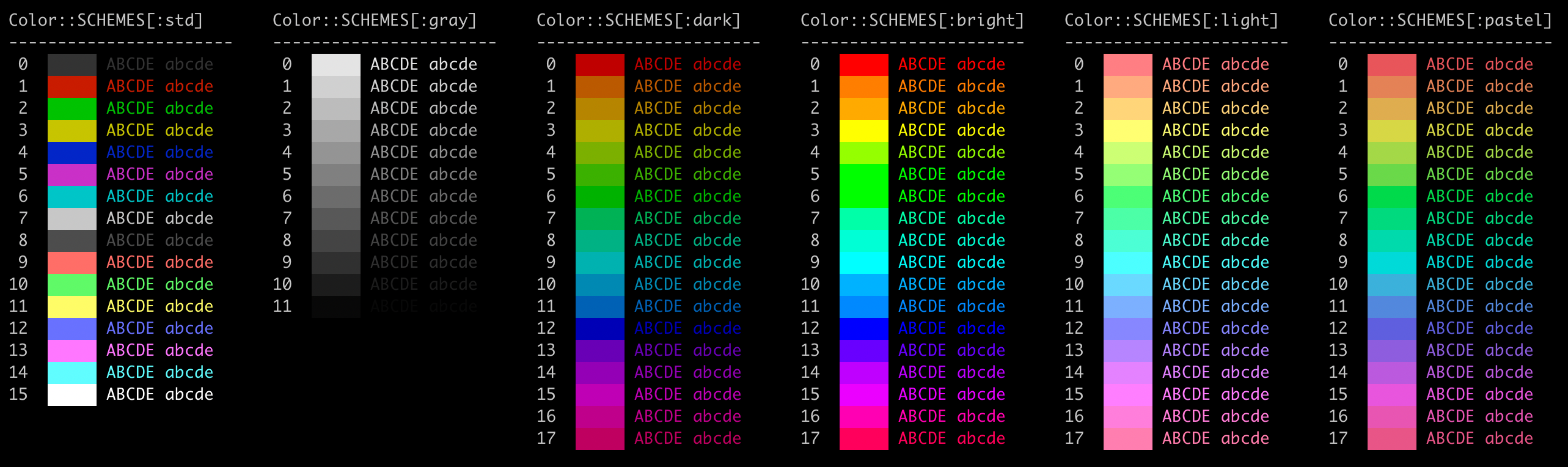
Hyperlinks
Print working hyperlinks (in supported terminals):
require "crystal_clear"

link = CrystalClear::Hyperlink.new("https://github.com/", "Github")
puts "Link to %s (hold Ctrl/Cmd and click the link)" % link.print
Try it: crystal run example/hyperlinks.cr
Contributing
- Fork it (https://github.com/bitmand/crystal_clear/fork)
- Create your feature branch (
git checkout -b my-new-feature) - Commit your changes (
git commit -am 'Add some feature') - Push to the branch (
git push origin my-new-feature) - Create a new Pull Request
Contributors
- bitmand - creator and maintainer