README
This README is the one indexed from the repository at its latest ref, not from the tag for this version.
Crystal Clear

Crystal library for building interactive and colorful terminal applications.
Installation
-
Add the dependency to your
shard.yml:dependencies: crystal_clear: github: bitmand/crystal_clear -
Run
shards install
Usage
require "crystal_clear"Examples
crystal run example/terminal-size.cr  # prints terminal size (rows, cols, pixels)
crystal run example/spinner.cr        # loading spinner
crystal run example/colors.cr         # prints color schemes
crystal run example/hyperlinks.cr     # prints text with working links
Terminal Size
require "crystal_clear"

term = CrystalClear::Terminal.new
puts term.size.cols
puts term.size.rows
Try it:
$ crystal run example/terminal-size.cr
Cols: 222
Rows: 38
Pixels: 3552 x 1520
Spinner
require "crystal_clear"

spinner = CrystalClear::Spinner.new(text: "Loading something... ")
sleep 5.seconds  # do some work for 5 sec
spinner.stop "done!"
Try it: crystal run example/spinner.cr
Colors
Print colored text:
require "crystal_clear"

CrystalClear::Color.print("text on purple background from :dark color scheme", :dark, bg: 13)
Set foreground and background colors:
require "crystal_clear"

CrystalClear::Color.set(:dark, fg: 0)
puts "dark red text from :dark color scheme"
CrystalClear::Color.set(:gray, bg: 1)
puts "dark red text on light gray background from :gray color scheme"
CrystalClear::Color.reset
puts "regular colored text"
Print rainbow text:
require "crystal_clear"

color = CrystalClear::Color.new(:pastel)
"This text is pastel rainbow colored".each_char{ |char| print color.next_fg + char }
puts color.reset
Print color schemes:
crystal run example/colors.cr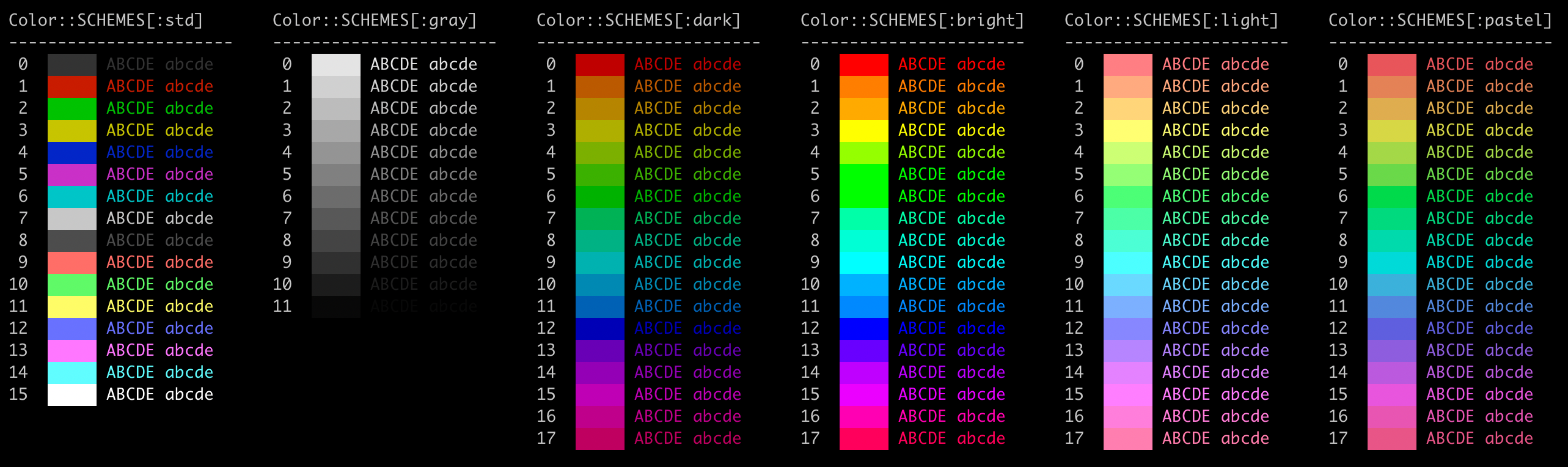
Hyperlinks
Print working hyperlinks (in supported terminals):
require "crystal_clear"

link = CrystalClear::Hyperlink.new("https://github.com/", "Github")
puts "Link to %s (hold Ctrl/Cmd and click the link)" % link.print
Try it: crystal run example/hyperlinks.cr
Contributing
- Fork it (https://github.com/bitmand/crystal_clear/fork)
- Create your feature branch (
git checkout -b my-new-feature) - Commit your changes (
git commit -am 'Add some feature') - Push to the branch (
git push origin my-new-feature) - Create a new Pull Request
Contributors
- bitmand - creator and maintainer