README
ChatGPT CLI

:eight_spoked_asterisk: Yet another ChatGPT command line tool.
2025-01-24
- ChatGPT CLI is not currently being actively developed.
- I recommend using aichat.
- However, I will continue to accept pull requests and issues.
Features
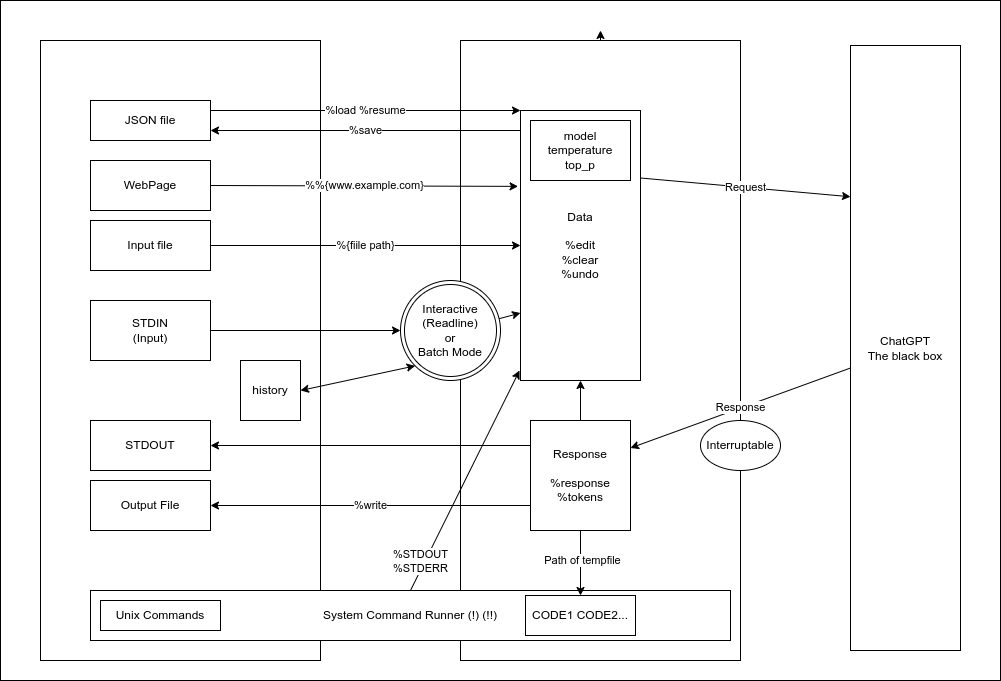
- Interactive mode using GNU Readline.
- Support for batch mode and mustache templates. (experimental)
- Ready-to-use system messages.
- Expand file contents from the
%{file/path}. - Magic commands to
%clear,%pop,%list,%w,%save, and%loaddata. - Execute system
!{commands}and pass captured stdout and stderr. - Code blocks in the response can be referenced from
$CODE0,$CODE1... - Syntax highlighting for code blocks using
bat. - Output
%HTML. - Support for clipboard.
Installation
GitHub Release
Download binaries from Github Release.
homebrew


brew install kojix2/brew/chatgpt-cliFrom source code (recommended)
- Install Crystal
sudo apt install libreadline-devbrew install readline
git clone https://github.com/kojix2/chatgpt-cli
cd chatgpt-cli
sudo make install
Please deactivate Conda environments when building to ensure correct linking.
Set your OpenAI API key
export OPENAI_API_KEY="your_openai_api_key"Proxy settings (optional)
export HTTP_PROXY=http://[IP]:[port]
export HTTPS_PROXY=https://[IP]:[port]
Set the environment variable CHATGPT_CLI_CONFIG.
The path to the directory where the configuration file will be saved. This is required on Windows.
Usage
Interactive mode
chatgpt i- To exit, type
exit,quit, or pressCtrl + D. - You can cancel a query to ChatGPT with
Ctrl + C. - GNU Readline supports Emacs shortcuts, such as
↑and↓. - Line breaks are not currently supported.
Batch mode
chatgptecho "hello" | chatgpt
# How can I assist you today?
echo "It's okay now. Rest." | chatgpt -r
# Thank you for your concern. I hope you have a pleasant day as well. Feel free to reach out if you need any assistance in the future. Take care and rest well!(under development)
cat paper.txt | chatgpt -m "Please summarize this paper."chatgpt -m "Please summarize this paper." paper.txtchatgpt -M gpt-5.1 -m "Please write a simple commit message" <(git diff --cached)Mustache template
Run chatgpt script with the crustache template engine. (experimental)
Please translate the following text into {{language}}.cat document.txt | chatgpt run -M gpt-5.1 translate.txt -- --language spanishMagic Commands
During the dialogue, you can use a variety of magic commands. %help
| Magic Command | Description |
|---|---|
%list %list[n] n | Displays the message(s). |
%clear | Clear all messages. Change the topic and set token back to zero. |
%pop <n> | Remove the last n messages and response [1]. |
%shift <n> | Remove first n messages and responses [1]. |
%copy <n> | Save the nth message to the clipboard. [-1] |
%write <filename> | Write the most recent message to a file. Save the text or code. |
%w <filename> | Alias for write. |
%config | Edit the config file. Open a text editor and rewrite the settings. |
%system | Show the current system message. |
%system <message> | Set a new system message. |
%edit | Edit data in JSON format. You are free to tamper with the past. |
%html <filename> | Export the conversation to HTML and launch your browser. |
%save <filename> | Save the data. This allows you to do things like "save session". |
%load <filename> | Load the data. This allows you to do things like "load session". |
%resume | Load data from auto-saved data file. |
%model <name> | Change the model. |
%tokens | Show number of tokens used from the ChatGPT response. |
%webapp | Open the ChatGPT website. |
%debug | Show debug message. |
%help | Show the help. Humans forget commands. |
Note that for %config, %data, and other commands launch an editor. The editor used can be set by the EDITOR environment variable.
System Commands
Execute the system command.
!pwdExecute the system command and capture %STDOUT and %STDERR.
!!git diff --cachedEmbed files
Improve the code: %{my/script.py}Find the bugs: %{src/*.py}Embed Standard Output
!{command} Execute the command and insert standard output and standard error output.
Please write a commit message: !{git diff}%STDOUT - captured standard output of !!{command}
Please write a commit message: %STDOUT%STDERR - captured standard error output of !!{command}
Explain this error message: %STDERRExtract code blocks
Syntax highlighting
The bat command is required. You can use the development version by setting the following environment variables and compiling.
CHATGPT_BAT=1 shards buildOnly code blocks are targeted for syntax highlighting.CHATGPT_BAT=2 shards buildThe entire response is considered markdown and subject to syntax highlighting.
Code block temporary file path $CODE0 $CODE1
- Code blocks are extracted and stored in temporary files
$CODE0,$CODE1, ... are path to the temporary files.
Write code to display 1 to 10 in Python and Ruby.Python:
```python
for i in range(1, 11):
print(i)
```
Ruby:
```ruby
(1..10).each { |i| puts i }
```! python $CODE0
! ruby $CODE1Save the code block to a file. (There is obvious room for improvement here)
!cp $CODE0 src/client.crConfiguration
Run chatgpt config to get the path to the configuration file.
config.json is located in ~/.config/chatgpt-cli/ by default.
embedded_patterns: Defines patterns for%{},!{},%STDOUTand%STDERRextraction pattern: Defines patterns for code block extraction.terminal_colors: Set colors forchatgpt,warning,debug,stdoutandstderr.
To edit, run chatgpt config --edit. Or use %config in interactive mode.
To reset, run chatgpt config --reset.
Uninstallation
ChatGPT CLI uses the following 3 files and directories. This is all there is to it.
rm /usr/local/bin/chatgpt   # Remove the executable
rm -r ~/.config/chatgpt-cli # Remove the config directory
rm ~/.chatgpt_history       # Remove command history
Contributing
Bug reports and pull requests are welcome on GitHub at https://github.com/kojix2/chatgpt-cli.
Development
crystal spec- You can quickly try development by using Gitpod.
Acknowledgements
This tool has been greatly influenced, both directly and indirectly, by the creative work of the following individuals.
- @mamantoha - http_proxy
- @hkalexling - Mango/src/util/proxy.cr
- @hidao80 - MonopolyGPT
- @lancecarlson - clipboard_manager.cr
- @makenowjust - crustache
- @Flipez - spinner
License
This project is open source and available under the terms of the MIT License.