chatgpt-cli
Version, currently 0.1.426 versions
- 0.7.0latestDec 10, 2025
- 0.6.1not indexedJun 19, 2026
- 0.6.0not indexedJun 19, 2026
- 0.5.0not indexedJun 19, 2026
- 0.4.4not indexedJun 19, 2026
- 0.4.3not indexedJun 19, 2026
- 0.4.2not indexedJun 19, 2026
- 0.4.1not indexedJun 19, 2026
- 0.4.0not indexedJun 19, 2026
- 0.3.2not indexedJun 19, 2026
- 0.3.1not indexedJun 19, 2026
- 0.3.0not indexedJun 19, 2026
- 0.2.3not indexedJun 19, 2026
- 0.2.2not indexedJun 19, 2026
- 0.2.1not indexedJun 19, 2026
- 0.2.0not indexedJun 19, 2026
- 0.1.9not indexedJun 19, 2026
- 0.1.8not indexedJun 19, 2026
- 0.1.7not indexedJun 19, 2026
- 0.1.6not indexedJun 19, 2026
- 0.1.5not indexedJun 19, 2026
- 0.1.4not indexedJun 19, 2026
- 0.1.3not indexedJun 19, 2026
- 0.1.2not indexedJun 19, 2026
- 0.1.1not indexedJun 19, 2026
- 0.1.0not indexedJun 19, 2026
github.com/kojix2/chatgpt-cli
Yet another ChatGPT command line tool
27 stars
0 dependents
License: MIT
Nothing has been indexed for 0.1.4 yet. The tag is recorded, its shard.yml has not been read, so the manifest and dependency list below are empty because they are unknown rather than because they are absent.
Installation
# Add this to your shard.yml
dependencies:
  chatgpt-cli:
    github: kojix2/chatgpt-cli
    version: ~> 0.1.4
Then run:
shards installshard.yml
No shard.yml has been indexed for 0.1.4. You can read it on the repository.
Dependencies
Unknown: the shard.yml for this version has not been read yet.
README
This README is the one indexed from the repository at its latest ref, not from the tag for this version.
# ChatGPT CLI
[](https://github.com/kojix2/chatgpt-cli/actions/workflows/build.yml)
:eight_spoked_asterisk: Yet another [ChatGPT](https://openai.com/chatgpt) command line tool.
2025-01-24
- ChatGPT CLI is not currently being actively developed.
- I recommend using [aichat](https://github.com/sigoden/aichat).
- However, I will continue to accept pull requests and issues.
## Features
- Interactive mode using [GNU Readline](https://tiswww.case.edu/php/chet/readline/rltop.html).
- Support for batch mode and mustache templates. (experimental)
- Ready-to-use system messages.
- Expand file contents from the `%{file/path}`.
- Magic commands to `%clear`, `%pop`, `%list`, `%w`, `%save`, and `%load` data.
- Execute system `!{commands}` and pass captured stdout and stderr.
- Code blocks in the response can be referenced from `$CODE0`, `$CODE1`...
- Syntax highlighting for code blocks using [`bat`](https://github.com/sharkdp/bat).
- Output [`%HTML`](https://github.com/hidao80/MonopolyGPT).
- Support for clipboard.
## Installation
### GitHub Release
Download binaries from [Github Release](https://github.com/kojix2/chatgpt-cli/releases/latest).
### homebrew
[](https://github.com/kojix2/homebrew-brew/actions/workflows/chatgpt-cli-macos.yml)
[](https://github.com/kojix2/homebrew-brew/actions/workflows/chatgpt-cli-ubuntu.yml)
```sh
brew install kojix2/brew/chatgpt-cli
```
### From source code (recommended)
- [Install Crystal](https://crystal-lang.org/install/)
- `sudo apt install libreadline-dev`
- `brew install readline`
```bash
git clone https://github.com/kojix2/chatgpt-cli
cd chatgpt-cli
sudo make install
```
Please deactivate Conda environments when building to ensure correct linking.
### Set your [OpenAI API key](https://platform.openai.com/account/api-keys)
```bash
export OPENAI_API_KEY="your_openai_api_key"
```
### Proxy settings (optional)
```
export HTTP_PROXY=http://[IP]:[port]
export HTTPS_PROXY=https://[IP]:[port]
```
<details>
<summary><b>Windows</b></summary>
Set the environment variable `CHATGPT_CLI_CONFIG`.
The path to the directory where the configuration file will be saved. This is required on Windows.
</details>
## Usage
### Interactive mode
```
chatgpt i
```
- To exit, type `exit`, `quit`, or press `Ctrl + D`.
- You can cancel a query to ChatGPT with `Ctrl + C`.
- GNU Readline supports [Emacs shortcuts](https://en.wikipedia.org/wiki/GNU_Readline), such as `↑` and `↓`.
- Line breaks are not currently supported.
### Batch mode
```
chatgpt
```
```sh
echo "hello" | chatgpt
# How can I assist you today?
echo "It's okay now. Rest." | chatgpt -r
# Thank you for your concern. I hope you have a pleasant day as well. Feel free to reach out if you need any assistance in the future. Take care and rest well!
```
(under development)
```sh
cat paper.txt | chatgpt -m "Please summarize this paper."
```
```sh
chatgpt -m "Please summarize this paper." paper.txt
```
```sh
chatgpt -M gpt-5.1 -m "Please write a simple commit message" <(git diff --cached)
```
#### Mustache template
Run chatgpt script with the [crustache](https://github.com/makenowjust/crustache) template engine. (experimental)
```
Please translate the following text into {{language}}.
```
```sh
cat document.txt | chatgpt run -M gpt-5.1 translate.txt -- --language spanish
```
### Magic Commands
During the dialogue, you can use a variety of magic commands. `%help`
| Magic Command | Description |
| ---------------------- | ------------------------------------------------------------------ |
| `%list` `%list[n]` `n` | Displays the message(s). |
| `%clear` | Clear all messages. Change the topic and set token back to zero. |
| `%pop <n>` | Remove the last n messages and response [1]. |
| `%shift <n>` | Remove first n messages and responses [1]. |
| `%copy <n>` | Save the nth message to the clipboard. [-1] |
| `%write <filename>` | Write the most recent message to a file. Save the text or code. |
| `%w <filename>` | Alias for `write`. |
| `%config` | Edit the config file. Open a text editor and rewrite the settings. |
| `%system` | Show the current system message. |
| `%system <message>` | Set a new system message. |
| `%edit` | Edit data in JSON format. You are free to tamper with the past. |
| `%html <filename>` | Export the conversation to HTML and launch your browser. |
| `%save <filename>` | Save the data. This allows you to do things like "save session". |
| `%load <filename>` | Load the data. This allows you to do things like "load session". |
| `%resume` | Load data from auto-saved data file. |
| `%model <name>` | Change the model. |
| `%tokens` | Show number of tokens used from the ChatGPT response. |
| `%webapp` | Open the ChatGPT website. |
| `%debug` | Show debug message. |
| `%help` | Show the help. Humans forget commands. |
Note that for `%config`, `%data`, and other commands launch an editor. The editor used can be set by the `EDITOR` environment variable.
### System Commands
Execute the system command.
```
!pwd
```
Execute the system command and capture `%STDOUT` and `%STDERR`.
```
!!git diff --cached
```
### Embed files
```
Improve the code: %{my/script.py}
```
```
Find the bugs: %{src/*.py}
```
### Embed Standard Output
`!{command}` Execute the command and insert standard output and standard error output.
```
Please write a commit message: !{git diff}
```
`%STDOUT` - captured standard output of `!!{command}`
```
Please write a commit message: %STDOUT
```
`%STDERR` - captured standard error output of `!!{command}`
```
Explain this error message: %STDERR
```
### Extract code blocks
#### Syntax highlighting
The [`bat`](https://github.com/sharkdp/bat) command is required. You can use the development version by setting the following environment variables and compiling.
- `CHATGPT_BAT=1 shards build` Only code blocks are targeted for syntax highlighting.
- `CHATGPT_BAT=2 shards build` The entire response is considered markdown and subject to syntax highlighting.
#### Code block temporary file path `$CODE0` `$CODE1`
- Code blocks are extracted and stored in temporary files
- `$CODE0`, `$CODE1`, ... are path to the temporary files.
```
Write code to display 1 to 10 in Python and Ruby.
```
````md
Python:
```python
for i in range(1, 11):
print(i)
```
Ruby:
```ruby
(1..10).each { |i| puts i }
```
````
```
! python $CODE0
! ruby $CODE1
```
Save the code block to a file. (There is obvious room for improvement here)
```
!cp $CODE0 src/client.cr
```
## Configuration
Run `chatgpt config` to get the path to the configuration file.
`config.json` is located in `~/.config/chatgpt-cli/` by default.
- `embedded_patterns`: Defines patterns for `%{}`, `!{}`, `%STDOUT` and `%STDERR`
- `extraction pattern`: Defines patterns for code block extraction.
- `terminal_colors`: Set colors for `chatgpt`, `warning`, `debug`, `stdout` and `stderr`.
To edit, run `chatgpt config --edit`. Or use `%config` in interactive mode.
To reset, run `chatgpt config --reset`.
[config.json](config.json)
## Uninstallation
ChatGPT CLI uses the following 3 files and directories. This is all there is to it.
```sh
rm /usr/local/bin/chatgpt # Remove the executable
rm -r ~/.config/chatgpt-cli # Remove the config directory
rm ~/.chatgpt_history # Remove command history
```
## Contributing
Bug reports and pull requests are welcome on GitHub at [https://github.com/kojix2/chatgpt-cli](https://github.com/kojix2/chatgpt-cli).
## Development
<details>
<summary><b>Overview</b></summary>
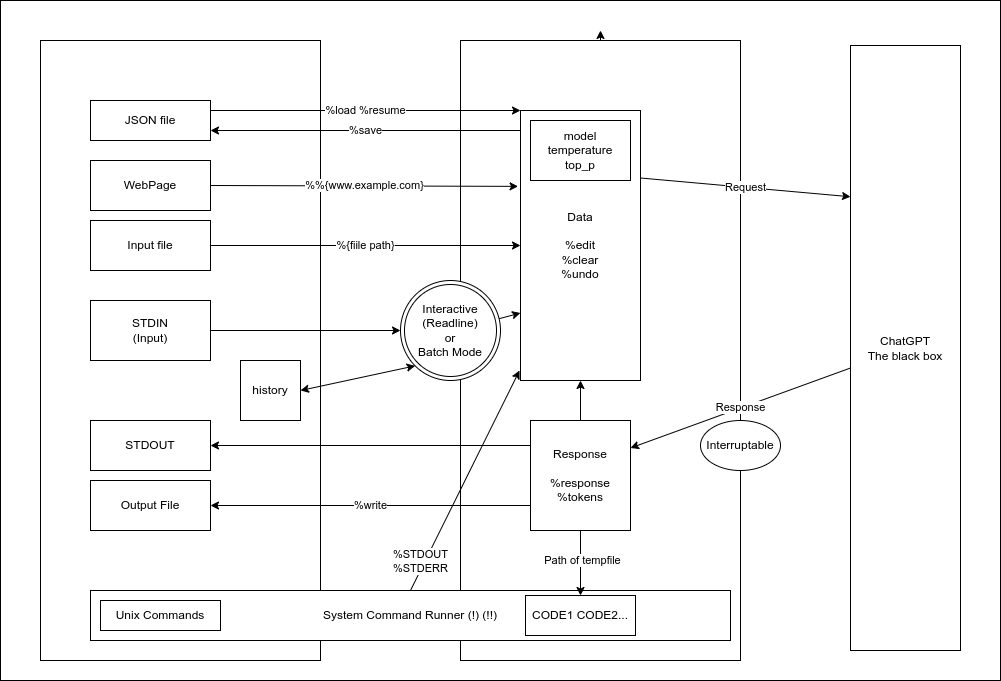
</details>
```
crystal spec
```
- You can quickly try development by using [Gitpod](https://www.gitpod.io/).
## Acknowledgements
This tool has been greatly influenced, both directly and indirectly, by the creative work of the following individuals.
- @mamantoha - [http_proxy](https://github.com/mamantoha/http_proxy)
- @hkalexling - [Mango/src/util/proxy.cr](https://github.com/getmango/Mango/blob/master/src/util/proxy.cr)
- @hidao80 - [MonopolyGPT](https://github.com/hidao80/MonopolyGPT)
- @lancecarlson - [clipboard_manager.cr](https://github.com/lancecarlson/chatcopy)
- @makenowjust - [crustache](https://github.com/makenowjust/crustache)
- @Flipez - [spinner](https://github.com/Flipez/spinner)
## License
This project is open source and available under the terms of the [MIT License](https://opensource.org/licenses/MIT).
Documentation
Built from the current release. The first visit to a release nobody has asked for starts its build.
Links
This release
- Version
0.1.4- Tagged
- Jun 19, 2026
- Commit
a18e54340131- Indexed
- not yet
Dependents
No indexed shard depends on this one yet.
Repository
github.com/kojix2/chatgpt-cli
Metadata
- Created
- Aug 12, 2026
- Updated
- Aug 12, 2026
- Synced
- Aug 12, 2026
- Versions
- 26