lucky_flow
Version, currently 0.4.025 versions
- 0.10.2latestApr 19, 2026
- 0.10.1not indexedApr 19, 2026
- 0.10.0not indexedApr 19, 2026
- 0.9.2not indexedApr 19, 2026
- 0.9.1not indexedApr 19, 2026
- 0.9.0not indexedApr 19, 2026
- 0.8.0not indexedApr 19, 2026
- 0.7.3not indexedApr 19, 2026
- 0.7.2not indexedApr 19, 2026
- 0.7.1not indexedApr 19, 2026
- 0.7.0not indexedApr 19, 2026
- 0.6.3not indexedApr 19, 2026
- 0.6.2not indexedApr 19, 2026
- 0.6.1not indexedApr 19, 2026
- 0.6.0not indexedApr 19, 2026
- 0.6.0-rc2not indexedApr 19, 2026
- 0.6.0-rc1not indexedApr 19, 2026
- 0.6.0-previewnot indexedApr 19, 2026
- 0.5.0not indexedApr 19, 2026
- 0.4.1not indexedApr 19, 2026
- 0.4.0not indexedApr 19, 2026
- 0.3.0not indexedApr 19, 2026
- 0.2.0not indexedApr 19, 2026
- 0.1.1not indexedApr 19, 2026
- 0.1.0not indexedApr 19, 2026
github.com/luckyframework/lucky_flow
Automated browser tests for web applications. Similar to Ruby's Capybara.
55 stars
5 dependents
License: MIT
Nothing has been indexed for 0.4.0 yet. The tag is recorded, its shard.yml has not been read, so the manifest and dependency list below are empty because they are unknown rather than because they are absent.
Installation
# Add this to your shard.yml
dependencies:
  lucky_flow:
    github: luckyframework/lucky_flow
    version: ~> 0.4.0
Then run:
shards installshard.yml
No shard.yml has been indexed for 0.4.0. You can read it on the repository.
Dependencies
Unknown: the shard.yml for this version has not been read yet.
README
This README is the one indexed from the repository at its latest ref, not from the tag for this version.
# LuckyFlow
[](https://luckyframework.github.io/lucky_flow)
LuckyFlow is a library for testing user flows in the browser. It is similar to
Ruby's Capybara.
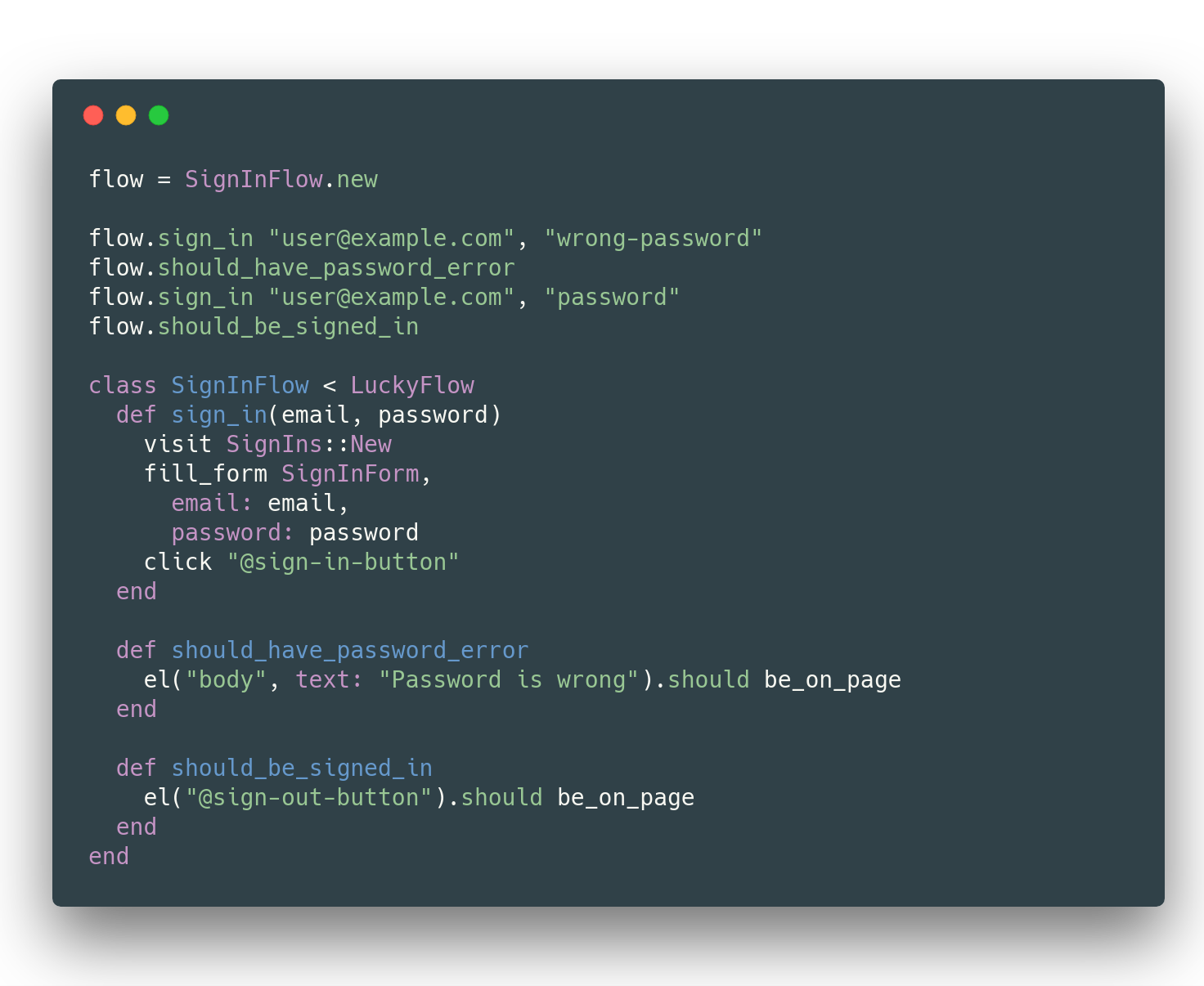
## Installation in [Lucky](https://luckyframework.org) projects
LuckyFlow is already installed and configured. Check out the guides
to see how to use it: https://luckyframework.org/guides/browser-tests/
## Installation in other Crystal projects
Add this to your application's `shard.yml`:
```yaml
development_dependencies:
lucky_flow:
github: luckyframework/lucky_flow
```
Configure LuckyFlow in `spec/spec_helper.cr`:
```crystal
require "lucky_flow"
LuckyFlow.configure do |settings|
# This is required
settings.base_uri = "http://localhost:<port>"
# Optional settings. Defaults are shown here
settings.retry_delay = 10.milliseconds
settings.stop_retrying_after = 1.second
settings.screenshot_directory = "./tmp/screenshots"
settings.browser_binary = "/Applications/Brave Browser.app/Contents/MacOS/Brave Browser"
end
# Put this at the bottom of the file.
# If a required setting is missing, this will catch it.
Habitat.raise_if_missing_settings!
```
Then view the guides: https://luckyframework.org/guides/browser-tests/
You should be ready to go!
For use with some of the Lucky shards (including Lucky itself), you'll need
to require a few extensions:
```crystal
# This extension adds an override to `visit` allowing you
# to pass in a Lucky::Action.class or Lucky::RouteHelper
require "lucky_flow/ext/lucky"
# This extension adds a `fill_form` method that you can pass
# an Operation or SaveOperation to which will populate form
# fields for you
require "lucky_flow/ext/avram"
# Similar to the Lucky extension, this gives an additional override
# to `visit` that allows you to visit a page as a specific User
require "lucky_flow/ext/authentic"
```
## Usage
> Note that you can only pass string paths to `visit` since only Lucky has
> route helpers described in the guide below. Example: `visit "/my-path"`
View guide at: https://luckyframework.org/guides/browser-tests/
## Development
> [!NOTE]
> If you use Flatpak to install Chrome, specs will fail to detect your Chrome binary.
> Install Chrome via a standard package install.
- Run format `crystal tool format spec/ src/`
- Run Ameba `./bin/ameba`
- Run specs `crystal spec` (or via docker with `./script/setup` and `./script/test`)
## Contributing
1. Fork it ( https://github.com/luckyframework/lucky_flow/fork )
1. Create your feature branch (git checkout -b my-new-feature)
1. Install docker and docker-compose: https://docs.docker.com/compose/install/
1. Run `script/setup`
1. Make your changes
1. Run `script/test` to run the specs, build shards, and check formatting
1. Commit your changes (git commit -am 'Add some feature')
1. Push to the branch (git push origin my-new-feature)
1. Create a new Pull Request
## Contributors
- [paulcsmith](https://github.com/paulcsmith) Paul Smith - creator, maintainer
Documentation
Built from the current release. The first visit to a release nobody has asked for starts its build.
Links
This release
- Version
0.4.0- Tagged
- Apr 19, 2026
- Commit
6db4abb54c18- Indexed
- not yet
Dependents
Repository
github.com/luckyframework/lucky_flow
Metadata
- Created
- Aug 12, 2026
- Updated
- Aug 12, 2026
- Synced
- Aug 12, 2026
- Versions
- 25